
Set up or update the bank account for an affiliate payout
Save the payee and bank details, verify the stored method, and distinguish updating an account from requesting a withdrawal.
On this page
Use with AI
Open Affiliate program → Payout center → Manage when you need to add or change the destination bank. A saved payout method tells Peregrine where to send a future withdrawal. It does not submit one.
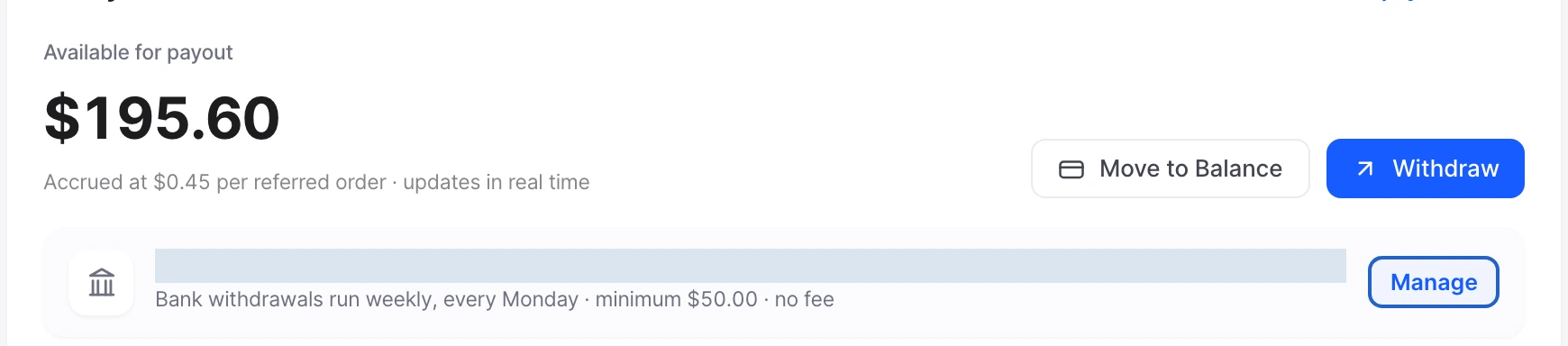
Open Payout center and select Manage on the payment-method row to add or update the destination.
- Manage
Enter and save the payee and bank details used for future withdrawals.
- Withdraw
Submit a separate withdrawal request to the saved account when eligible.
- Move to Balance
Transfer eligible affiliate earnings to the Peregrine spending wallet.
Complete the payout method
Use bank details from the receiving institution. Check the payee’s first and last name, address, city, bank country, currency, bank name and account number or IBAN. Enter the appropriate SWIFT/BIC or the US routing number where the form offers that route. Follow the form’s field messages for your details. Enter sensitive bank information in the signed-in payout form.
Choose Save payout method and wait for the confirmation. Close and reopen Manage to check the stored method. If a loading or save error appears, refresh and inspect what is already saved before re-entering details. If you only intended to change the destination, you can stop here.

In Payout method, choose the bank country and account currency from your banking instructions. This example shows Netherlands and EUR.
If a withdrawal is already pending
The confirmation explains that future withdrawals use the saved account. If a pending request should go somewhere different, contact support with its amount, date and reference and request confirmation of the applicable destination. Keep full bank account details out of an ordinary support screenshot.
Common questions
Why does a withdrawal say to save a payout method when I already typed one?
Entering the fields prepares a draft. The withdrawal requires the saved account. Check for the successful save and reopen its details.
Do I use this form to add funds for shipping my orders?
This is an affiliate payout destination. Use Top up to fund your fulfillment wallet, or Move to Balance when transferring eligible affiliate earnings internally.
What if the page says it cannot read my existing payout method?
Refresh and check again. An unreadable method is not evidence that no method exists. If the problem persists, report the displayed error through the official support channel.