Available and Occupied: how your balance works
Two numbers in your top bar, and why one of them moves.
There are two numbers in your top bar, side by side, and they mean different things.

Available is money you can spend on new orders.
Occupied is money set aside for orders already in progress. It has not been spent. It is reserved, and it is still yours.
Add them together and that is your total balance.
Why money gets held
Peregrine runs on a prepaid balance. You top up, and we deduct as orders ship.
The moment an order arrives, we do not know the final cost yet. The factory price can shift, and the shipping cost depends on the real packed weight, which nobody knows until it is packed. So instead of guessing and billing you twice, we hold an estimate.
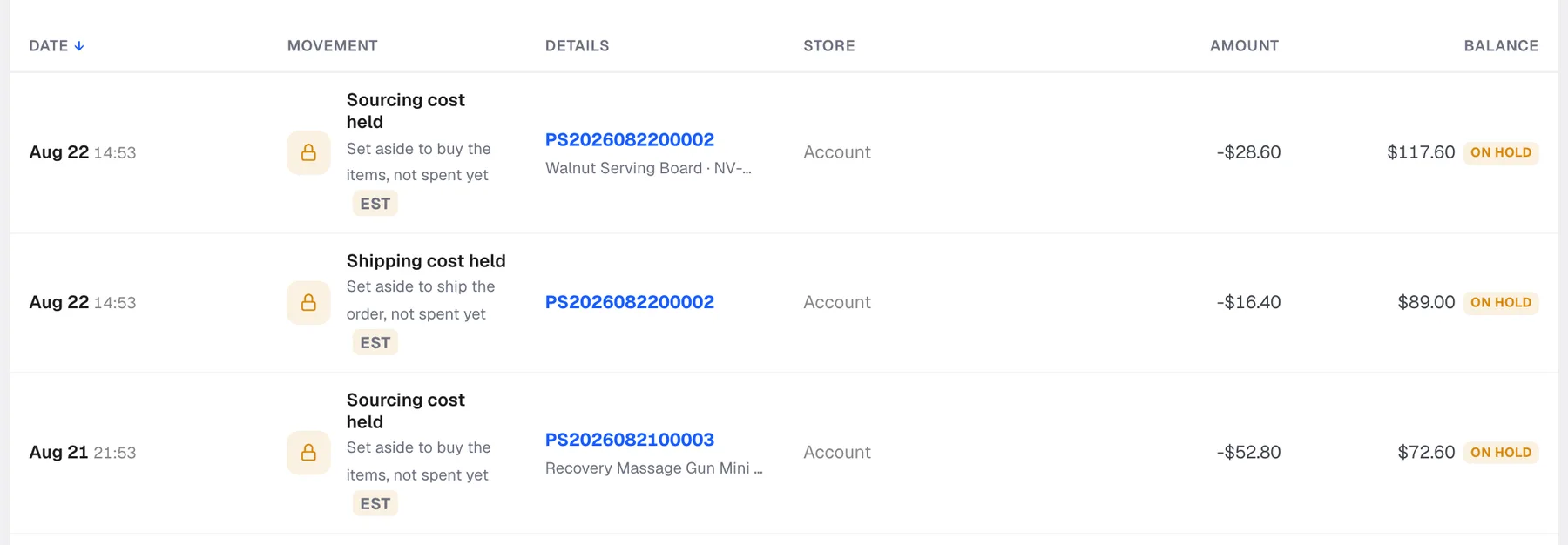
Each order can put two holds on your balance:
- Sourcing cost held. Set aside to buy the item. Only on items we source on demand.
- Shipping cost held. Set aside to ship the parcel.
Both appear on the Billing screen with an EST badge, which means estimated, and an ON HOLD tag.
What happens to a hold
One of three things, always:
- It becomes a charge. We spend the money, the hold converts, and the amount leaves your balance for real.
- The difference releases. The real cost came in under the estimate, so the leftover goes straight back to Available.
- The whole thing releases. The order was cancelled and never shipped, so nothing was spent and all of it comes back.
You are never charged for an order that did not ship.
To see this happening, open Billing and click the Holds and releases tab. Every hold and every release is listed with the order it belongs to.

Reading the Balance movements table
Five tabs, and each one answers a different question.
| Tab | What it shows |
|---|---|
| All | Every movement in date order |
| Charges | Money actually spent |
| Holds and releases | Money reserved, and money given back |
| Top-ups | Money you added |
| Adjustments | Manual corrections, for example a credit |
The columns run Date, Movement, Details, Store, Amount and Balance. Details carries the order number, so you can click any line and land on the order that caused it. Balance is your running total after that movement, which makes it straightforward to reconcile a period end to end.
Use Cost type and Period to narrow the list, and Export charges to pull it out for your accountant.
The four cards at the top

- Spend in your selected period, with the change against the period before
- Orders charged, split into shipping charges and sourcing charges
- Top-ups added in the period
- Avg cost per order across the orders charged
All four follow the date range in the top right. Change the range and they all recalculate.
Why Available can drop without a charge
This is the single most common question about the balance, so it is worth being plain.
If ten orders come in overnight, ten sets of holds are placed. Your Available number falls straight away, even though nothing has shipped and nothing has been spent. Occupied rises by the same amount.
Nothing has left your account. Check the Holds and releases tab and you will see every one of them.
Keep Available above zero
If Available reaches zero, new orders cannot be funded and they will not ship. Held money cannot be used for this, because it is already committed to orders in progress.
Two things to do:
- Top up before you need to, not when an order is already waiting. Use the + button in the top bar or Top up balance on the Billing screen.
- Keep your low balance notifications switched on so you get warned early. See Notifications.
Watch the Avg cost per order card. Multiply it by the orders you expect this week and you have the number you need in the account.
Frequently asked
Is Occupied money I have lost? No. It is yours, reserved against orders in progress. It either becomes a charge or comes back.
Why is the held amount different from the final charge? The hold is an estimate, marked EST. Real shipping cost depends on the packed weight. Any difference is released back to you.
I cancelled an order. When does the money return? On cancellation. The hold releases and Available goes back up. You will see it on the Holds and releases tab.
Can I spend Occupied money on a new order? No. It is committed to orders already in the pipeline.
Are there fees on top of what I see here? No. Order processing is already included in the prices you are quoted. The calculator prices are final.
Still need help?
Real humans on every reply. Average response under 2 hours during business hours.