The Billing screen
Charges, holds, top-ups, and how to reconcile a month.
What it is
Your balance, every movement on it, and your paperwork.
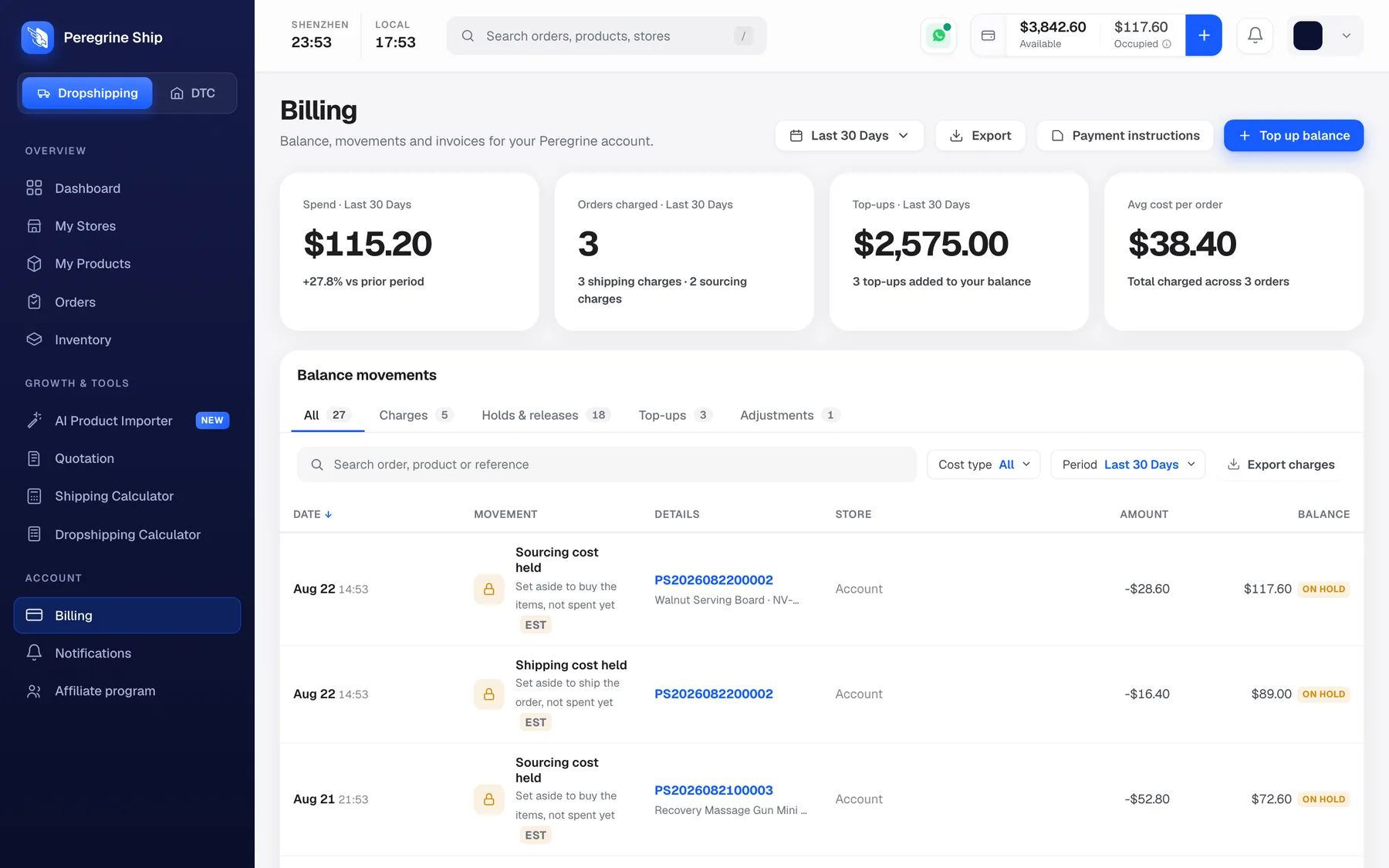
The four cards
| Card | What it counts |
|---|---|
| Spend | What you spent in the period, with the change against the period before |
| Orders charged | How many, split into shipping and sourcing charges |
| Top-ups | What you added in the period |
| Avg cost per order | Across the orders charged |
All four follow the date range at the top right. Avg cost per order is the one to remember, because it is how you work out what to top up.
Balance movements
Every movement, in five tabs.
| Tab | What it shows |
|---|---|
| All | Everything, in date order |
| Charges | Money actually spent |
| Holds and releases | Money reserved, and money given back |
| Top-ups | Money you added |
| Adjustments | Manual corrections |
Holds and releases is the tab that answers most billing questions. If money has moved and nothing has shipped, it is here. See Available and Occupied.
Reading a row
Date, Movement, Details, Store, Amount, Balance.
- Movement says what happened in words, for example "Sourcing cost held", with the tag EST where the figure is an estimate and ON HOLD where the money is reserved rather than spent.
- Details carries the order number, so you can go straight to the order that caused it.
- Balance is your running total after that movement, which is what makes a period reconcilable end to end.
Filters and export
- Search by order, product or reference
- Cost type and Period to narrow the list
- Export charges for your accountant
- Export at the top for the wider view
- Payment instructions, for funding details
- Top up balance
Reconciling a month
- Set the date range to the month.
- Note the opening and closing Balance on the first and last rows of the All tab.
- Check Top-ups for what went in.
- Check Charges for what was spent.
- Anything left is in Holds and releases, still committed to orders in progress.
- Export charges if you need it in a spreadsheet.
A movement you cannot explain: click through on the order number in Details. That is nearly always the answer.
Frequently asked
Why is a charge different from the hold? The hold is an estimate marked EST. The difference releases back. What is an Adjustment? A manual correction. Ask us if you see one you do not recognise. Can I get an invoice? Ask support and tell them what your accountant needs. Can I export everything? Export charges covers the ledger. Ask support if you need a fuller history. A charge does not look right. Click the order number in Details, then send us the order number. Where do receipts for top-ups live? On the Top-ups tab.
Still need help?
Real humans on every reply. Average response under 2 hours during business hours.