My Products: your catalogue explained
Every column and badge on your catalogue screen.
What this screen is
Every product you sell through us, across every connected store, with what it costs you and what it earns you.
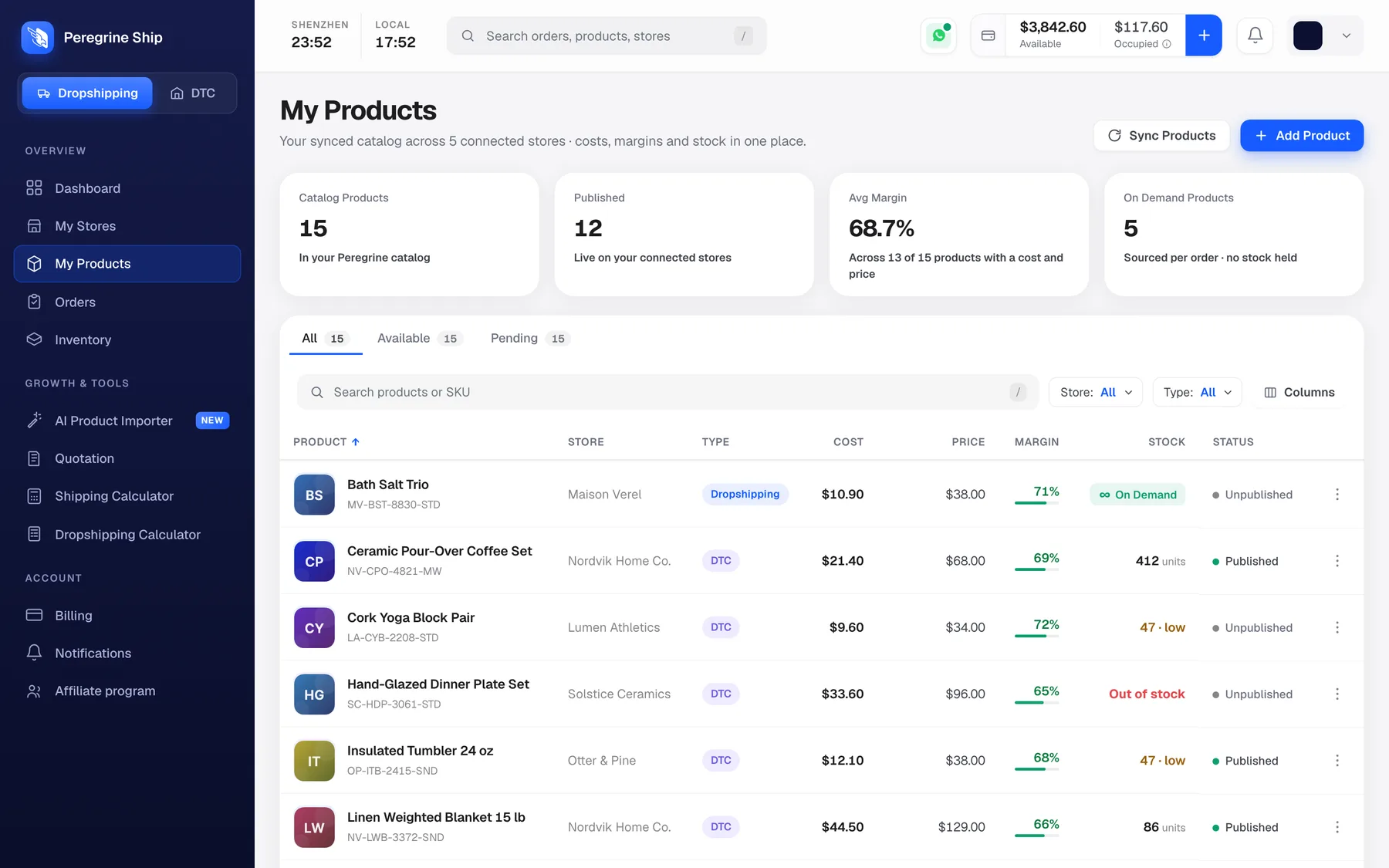
The four cards at the top:
| Card | What it means |
|---|---|
| Catalog Products | Everything in your Peregrine catalogue |
| Published | How many are live on your stores right now |
| Avg Margin | Your average margin, across products that have both a cost and a price |
| On Demand Products | Sourced per order, no stock held |
Avg Margin says "across 13 of 15 products with a cost and a price". If that number is lower than your product count, some products are missing a cost or a price and are not being counted. Worth fixing, because those are the products you cannot see the economics of.
Reading the table
| Column | What it tells you |
|---|---|
| Product | Name, with the SKU underneath |
| Store | Which of your stores it belongs to |
| Type | Dropshipping or DTC |
| Cost | What the product costs you |
| Price | What you sell it for |
| Margin | The gap, as a percentage, with a bar |
| Stock | Units in the warehouse, or On Demand |
| Status | Published or Unpublished |
Cost and Price
Cost is what the product costs you. Price is what your customer pays. Margin is calculated from the two, so it updates on its own when either changes.
This is product margin, not profit. It does not include shipping, and it does not know what you spent on ads. For the full picture on a product before you commit to it, use the Dropshipping Calculator.
Type: Dropshipping or DTC
The most important badge on the screen.
Dropshipping means sourced per order. You hold no stock. An order arrives, we buy the item and ship it. Nothing to buy up front, and the Stock column reads On Demand rather than a number.
DTC means you hold stock with us. Orders ship from units already in the warehouse, which is faster because there is no sourcing step.
You can run both at once. Test a product on demand, and once it sells, move it to stock.
Stock
Three things you will see:
- On Demand. No stock held, sourced per order. This is normal, not a problem.
- A number. Units in the warehouse.
- 47 · low in amber, or Out of stock in red. Act on these.
See Inventory levels for the thresholds.
Status: Published or Unpublished
Published means live on your store and buyable.
Unpublished means it exists in your catalogue but is not on sale.
Unpublished is not an error. A product can be perfectly healthy and deliberately unpublished, for example one you are still pricing. But if you expected something to be live and it is not, this column is the first place to look.
SKU
The code under each product name. It is what we match on when your Shopify catalogue syncs across.
A product with a blank or duplicated SKU in Shopify has nothing to match on, and that is the single most common reason a product does not appear here after syncing. Give every product and every variant its own SKU.
The three tabs
All is everything. Available and Pending split it.
Finding things
- Search by product name or SKU. Press / from anywhere to jump into it.
- Store filters to one store.
- Type filters to Dropshipping or DTC.
- Columns shows and hides columns, so you can strip the table back to what you are working on.
The ⋮ at the end of each row opens the actions for that product.
Adding products
Sync Products pulls your Shopify catalogue in. Press it after adding or changing products in Shopify. See My Stores.
Add Product adds one by hand, for something not in a connected store.
AI Product Importer brings products in from a link instead of typing them out. See Import products with AI.
For something we do not carry yet, ask for a price first. See How to get a product quoted.
Frequently asked
Cost is blank on some products. Those have not been quoted yet, so there is nothing to calculate a margin from. They are also excluded from your Avg Margin.
Can I change the price here? Price comes from your store. Change it in Shopify and sync.
My product is in Shopify but not here. Press Sync Products. If it is still missing, check the SKU.
Should I be Dropshipping or DTC? Start on demand while you are testing, because you are not buying stock for something that may not sell. Once a product sells consistently, holding stock ships it faster.
Is Unpublished a problem? Only if you meant it to be live.
Still need help?
Real humans on every reply. Average response under 2 hours during business hours.