Introducing the new Peregrine platform
 By Bojan Dimov July 31, 2026 13 min read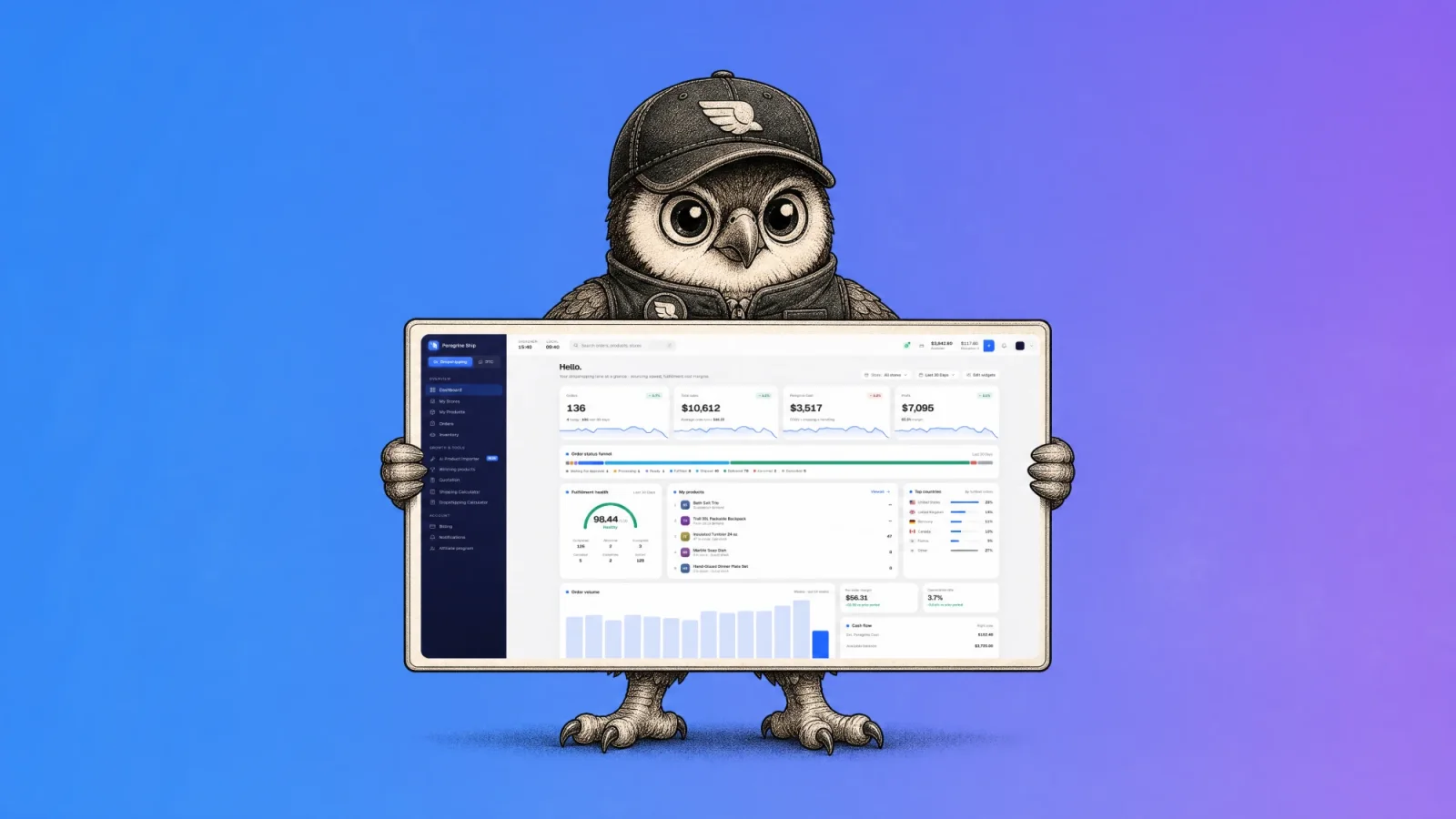
The new Peregrine platform is live for every merchant today.
Fulfillment has always been a black box. You send money to a warehouse twelve thousand kilometres away, an estimate appears on a screen, and weeks later an invoice arrives carrying a different number. Nobody explains the gap.
One rule ran this entire build: if a number is on your screen, it has to be the number you actually pay. That principle reshaped fifteen screens, replaced the quote engine, added AI inventory forecasting that flags a stockout before it costs you an order, and rewrote the page your customer lands on when they check where their parcel is.
Here is what shipped.
Dashboard
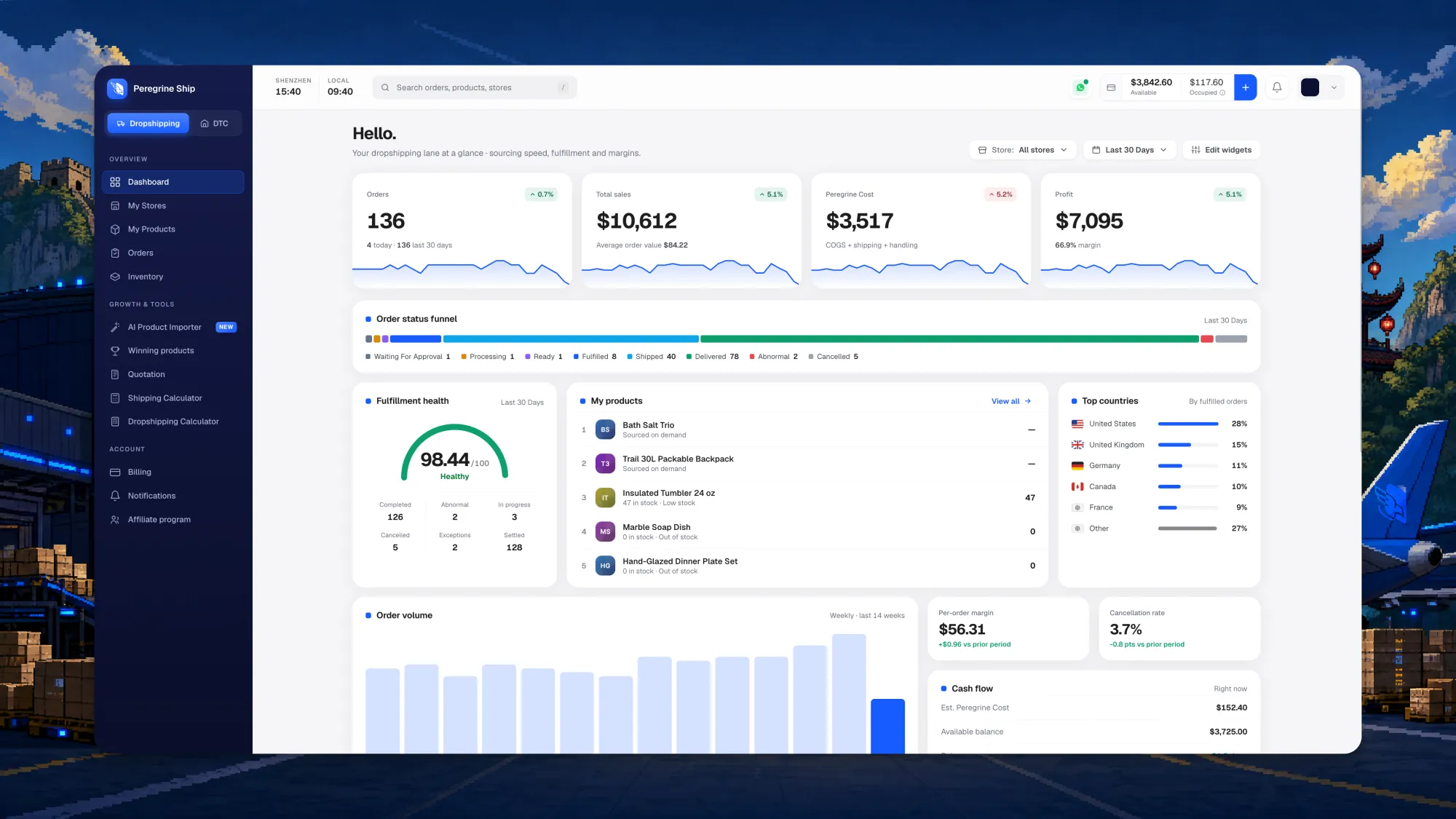
Most fulfillment dashboards greet you with a number that cannot pay your rent. Orders shipped. Parcels moving. True, but not the question you woke up with.
Four cards now open the screen in the order an operator actually thinks: orders, total sales with average order value, your Peregrine cost split into COGS plus shipping plus handling, and profit with the margin percentage beside it. Each carries a sparkline, so you read the shape of thirty days rather than one frozen total.
The order status funnel places every order where it truly sits, from waiting for approval through processing, ready, fulfilled, shipped and delivered, with abnormal and cancelled broken out rather than buried in an average. The fulfillment health score compresses the same picture into a single figure.
Two details came from watching operators work rather than from a design brief. The top bar carries two clocks, Shenzhen and yours, because before you message the warehouse it helps to know whether anyone is awake. And the view is lane-aware: one toggle switches between your Dropshipping and DTC business, and the accent colour follows it, so you never misread one side of your company as the other.
Orders
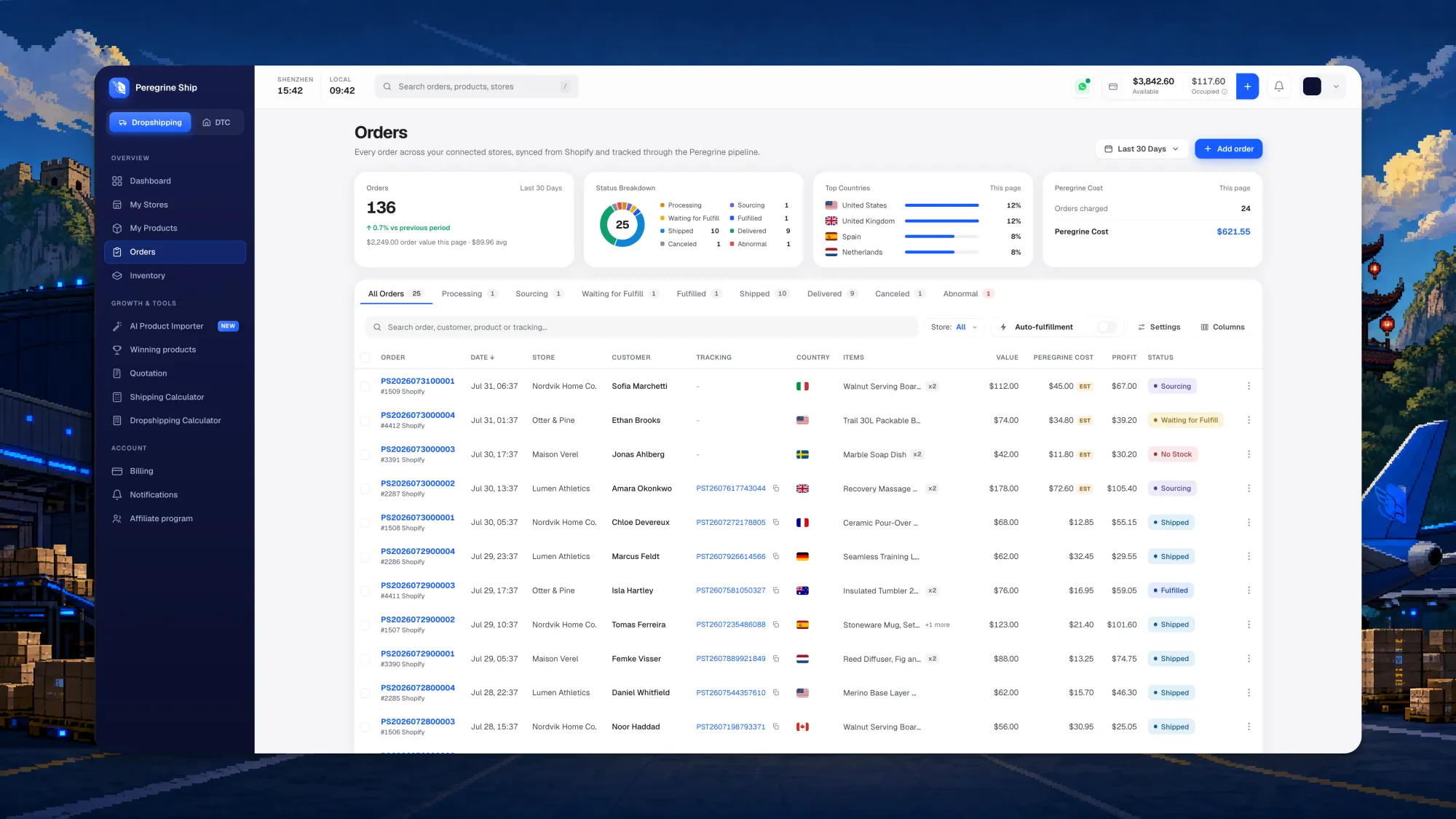
Every order across every connected store, in one table, with status tabs carrying live counts so you land on the twelve orders that need you instead of scrolling past the four hundred that do not.
The important part sits at the right of each row: value, Peregrine cost and profit, per order, in the list itself. Not in a monthly export. Not in a spreadsheet you rebuild by hand. On the row, beside the customer's name, while the order is still live enough to act on.
Three deliberate choices here:
- The tracking number sits on the row with a copy button. A customer asks where their parcel is and you answer without opening anything.
- Estimated costs are labelled
EST. When a number is still an estimate, the screen says so rather than showing something confident that quietly changes later. - Auto-fulfillment is a switch you control, per store, directly above the table.
Products and stores
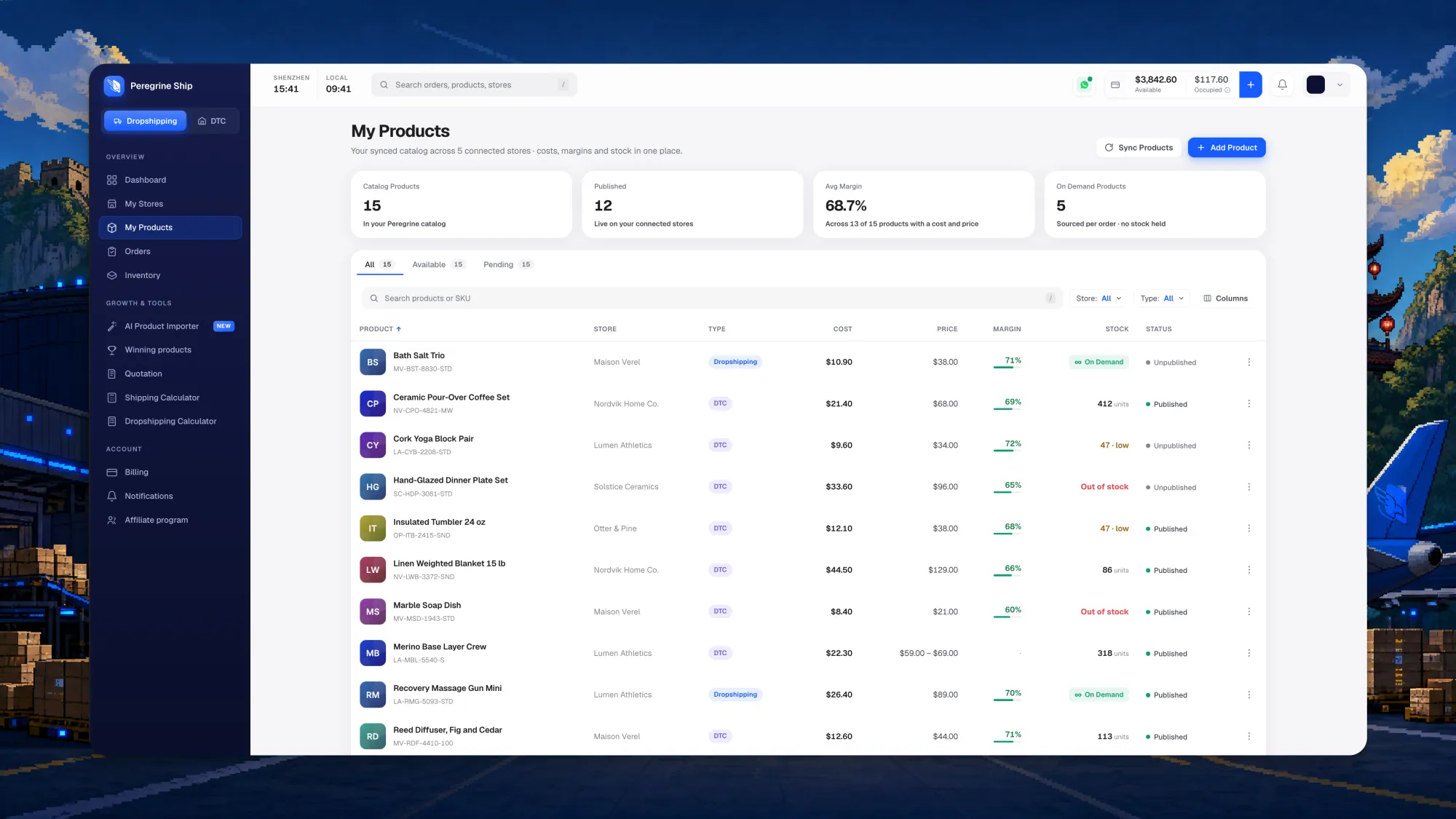
A product list showing only names and images is a filing cabinet. This one carries cost, price, margin as both a number and a bar, stock and publish state, across every store you have connected. Products sourced per order show an On Demand badge instead of a stock figure, because holding zero units is the point of that model rather than a warning.
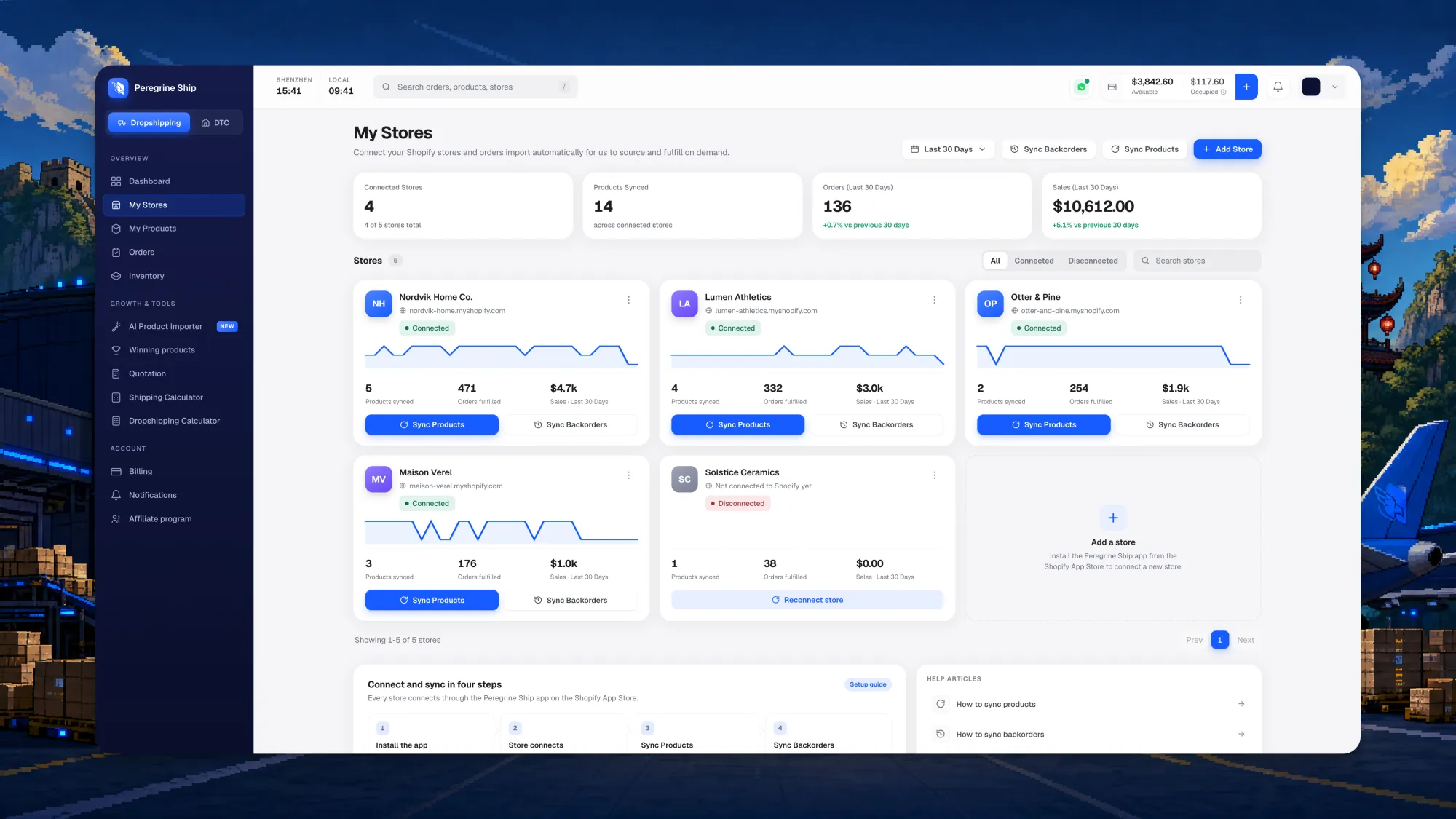
Each connected Shopify store is a card with its own sparkline, products synced, orders fulfilled, sales for the period and its own controls. A store that drops its connection shows a reconnect button instead of failing quietly in the background for a week.
Two of those controls deserve naming, because they are the ones that keep a store honest:
- Sync Products pulls your Shopify catalog across so every SKU exists on our side and can be matched, quoted and sourced. Run it after you add products and the catalog stays aligned.
- Sync Backorders brings across orders that are still waiting on fulfillment, so a store you connect today does not strand the orders it took yesterday. This is the step most platforms skip, and it is the reason a migration usually hurts.
Setting up runs in four steps at the bottom of that screen: install the app, connect the store, sync products, sync backorders. Connect your store starts it.
Inventory and inbounds
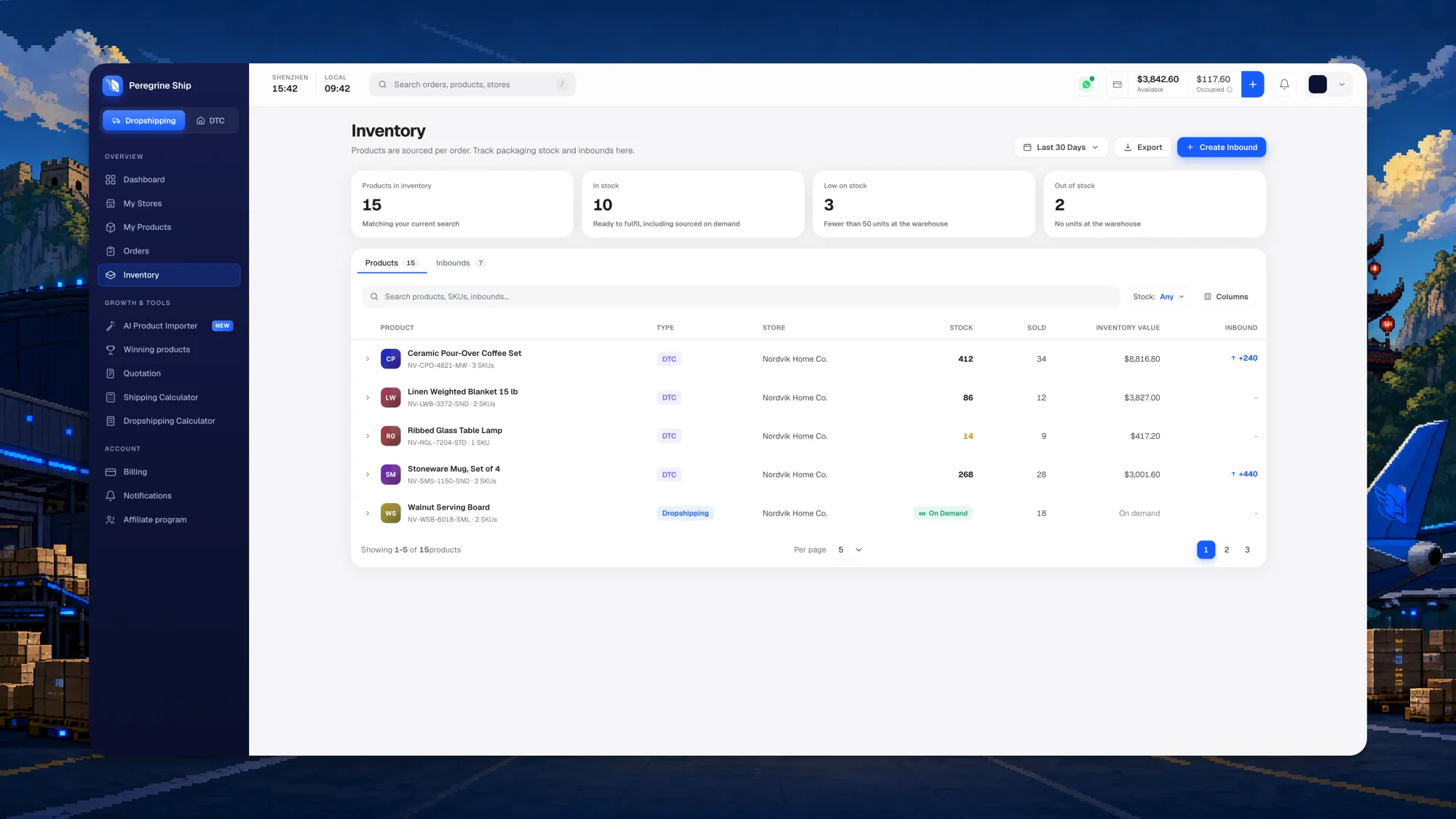
Inventory separates what you hold from what is on its way. The counters that change your day sit at the top: in stock, low on stock, and out of stock, with low defined concretely as fewer than 50 units at the warehouse rather than left to interpretation. Each product carries stock, units sold, inventory value and an inbound column.
Inbounds are now a first-class part of the screen. When you send your own stock to our Shenzhen warehouse, you create an inbound telling us what is coming and in what quantity. It arrives, our team receives it against your inbound, checks it, and shelves it, and the units appear against your SKU. The inbound column on the product row shows what is inbound while it is still in transit, so the number you are planning against includes the stock you have already committed to, not just the stock on the shelf today. Creating one is a button on this screen rather than a support ticket, and inbound approvals and flags arrive in your notifications.
AI across the platform
Stockouts are the most expensive failure in this business. You pay for the ad, win the click, take the order, and then cannot ship it. The customer does not experience that as a supply chain problem. They experience it as your brand failing them.
AI inventory forecasting is live, and it exists to remove that failure. The platform reads sell-through per SKU across your connected stores, learns the pace each product is actually moving at, and projects the date it runs out. Instead of finding out you are empty when an order cannot be fulfilled, you get a reorder point that arrives while there is still time to act: raise an inbound, or let a dropshipping SKU keep sourcing on demand. It is the difference between planning inventory and reacting to it. Low stock and reorder alerts flow into your notifications on whichever channel you chose.
Two more AI tools are arriving in the sidebar, both visible now behind a coming-soon lock:
- Winning Products surfaces products with real demand signals behind them, so product research starts from evidence rather than from a screenshot of somebody's ad.
- AI Product Importer takes a product and builds the listing around it, so getting a new SKU into your store stops being an afternoon of copy and paste.
Both will announce themselves in your notifications the day they open.
The Drop
Five winning products every week. Real margins, real factories, ready to import.



The Dropshipping Calculator
The calculator was rebuilt on the same principle as everything else here: it runs through the same pricing path your invoice runs through, so the quote you see before you sell is the cost you carry after. It is live under Growth and Tools, and it has a page of its own with the full walkthrough, from paste-a-link to a priced product in your store. The worked-example math, four scenarios with every line shown, is in how to calculate dropshipping profit. The pricing model behind it stays public on the pricing page in the meantime.
Billing
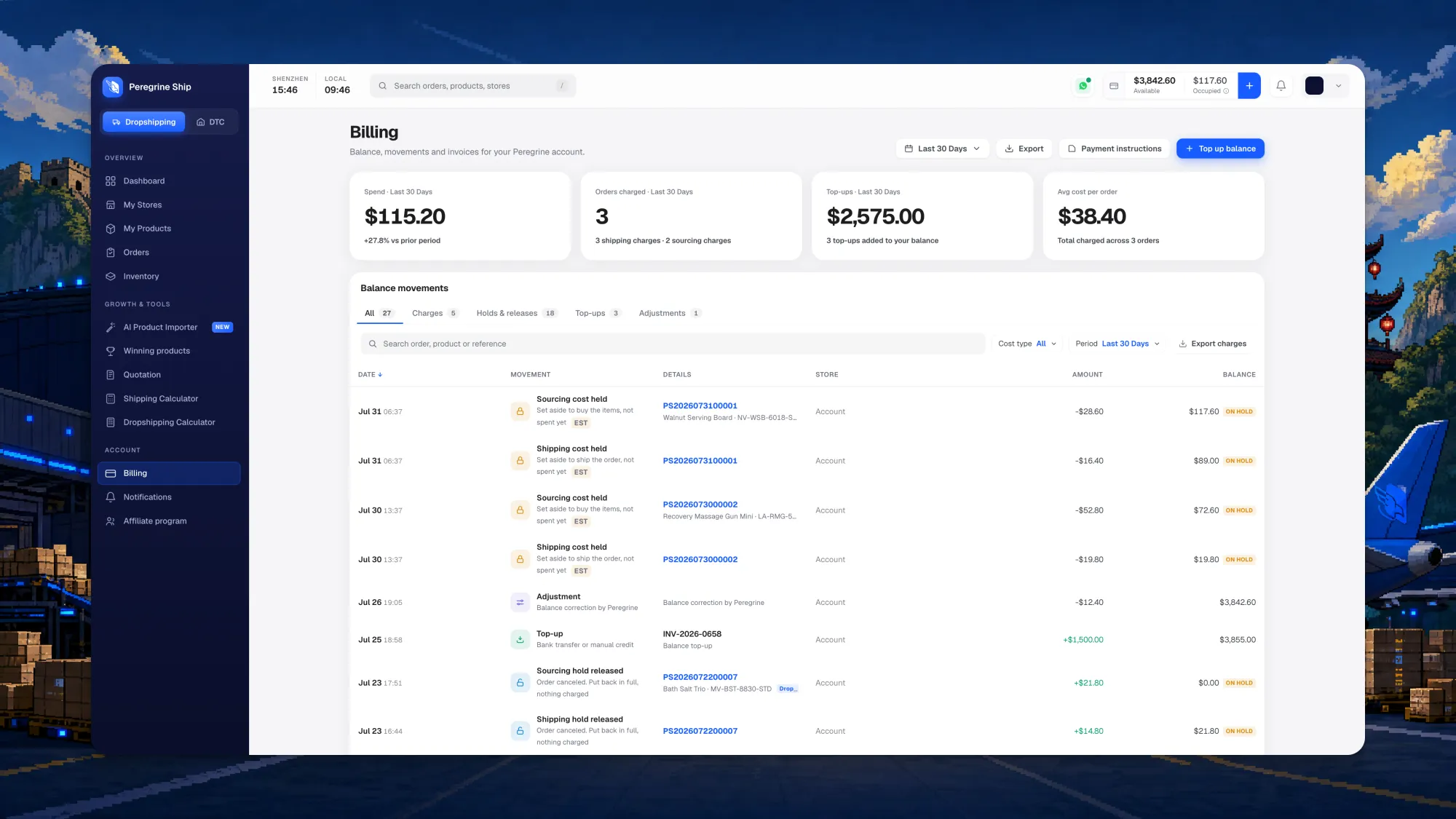
If you look at one screenshot in this post, make it this one. It is where the principle stops being a slogan.
Peregrine runs on a top-up balance: you add funds and each order draws from it when it ships. That model only deserves trust if every movement is auditable, so the balance table is written in words rather than accounting shorthand:
- "Sourcing cost held", noted as set aside to buy the items, not spent yet
- "Shipping cost held", the same
- "Sourcing hold released", noted as order cancelled, put back in full, nothing charged
- Top-ups, adjustments, and a running balance beside every line
Holds wear an ON HOLD badge, estimates wear EST, tabs split charges from holds and releases from top-ups and adjustments, and the ledger exports to CSV. The summary cards carry spend for the period, orders charged, top-ups added and average cost per order, which is the figure most operators want weekly and rarely have without building it themselves.
No rule says a fulfillment ledger has to read like this. Most read like a bank statement written by someone hoping you will not check.
Notifications
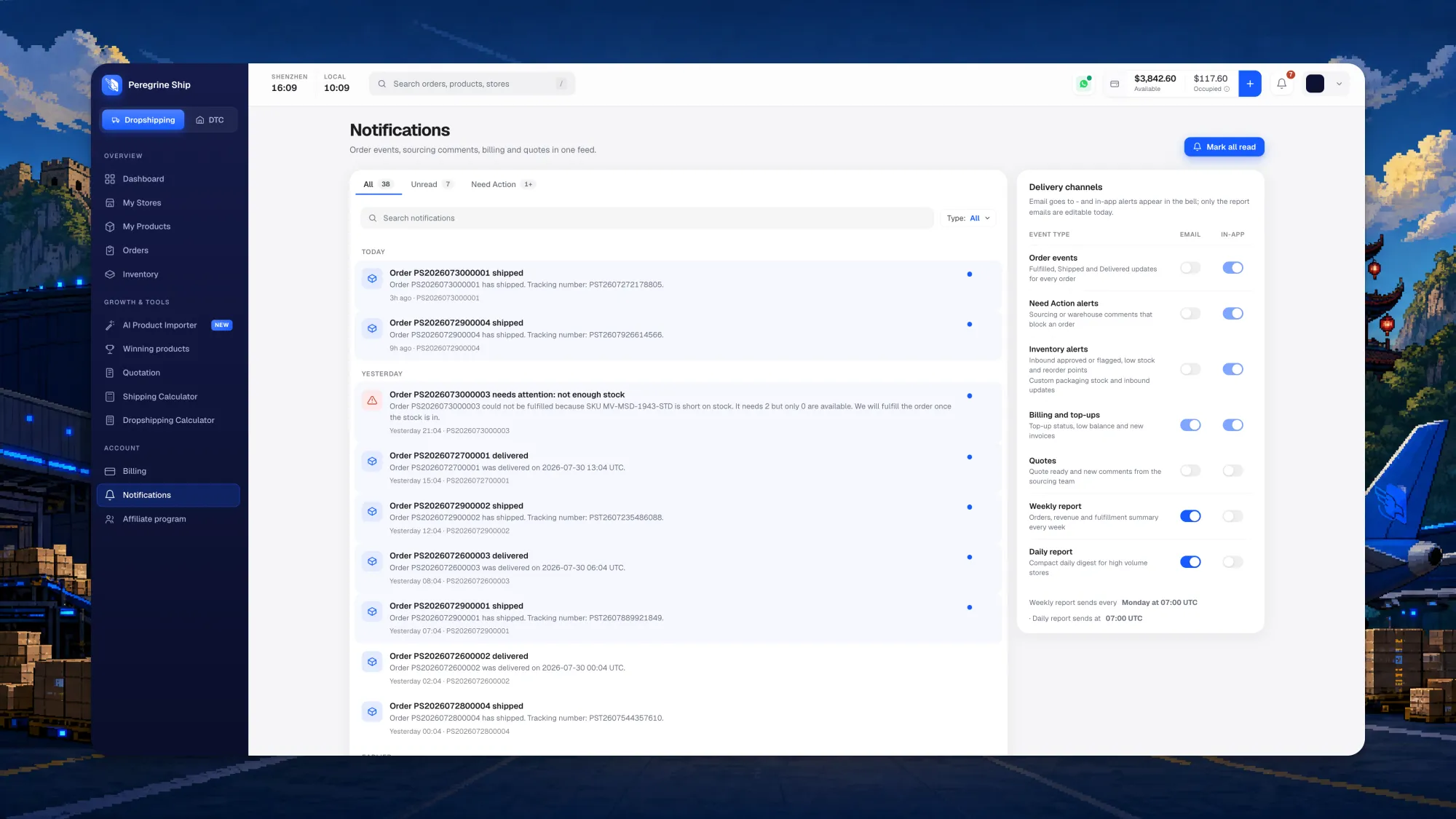
One feed for order events, sourcing comments, billing and quotes, split into all, unread and need action.
The panel on the right is the feature: a delivery channel matrix. Every event type, order events, need-action alerts, inventory alerts, billing and top-ups, quotes, weekly report and daily report, carries its own email switch and its own in-app switch. You draw the line between what interrupts you and what waits in the bell.
Alerts read like a person wrote them. When an order cannot be fulfilled because a SKU is short, it names the SKU, how many were needed, how many exist, and what happens next.
Affiliate program
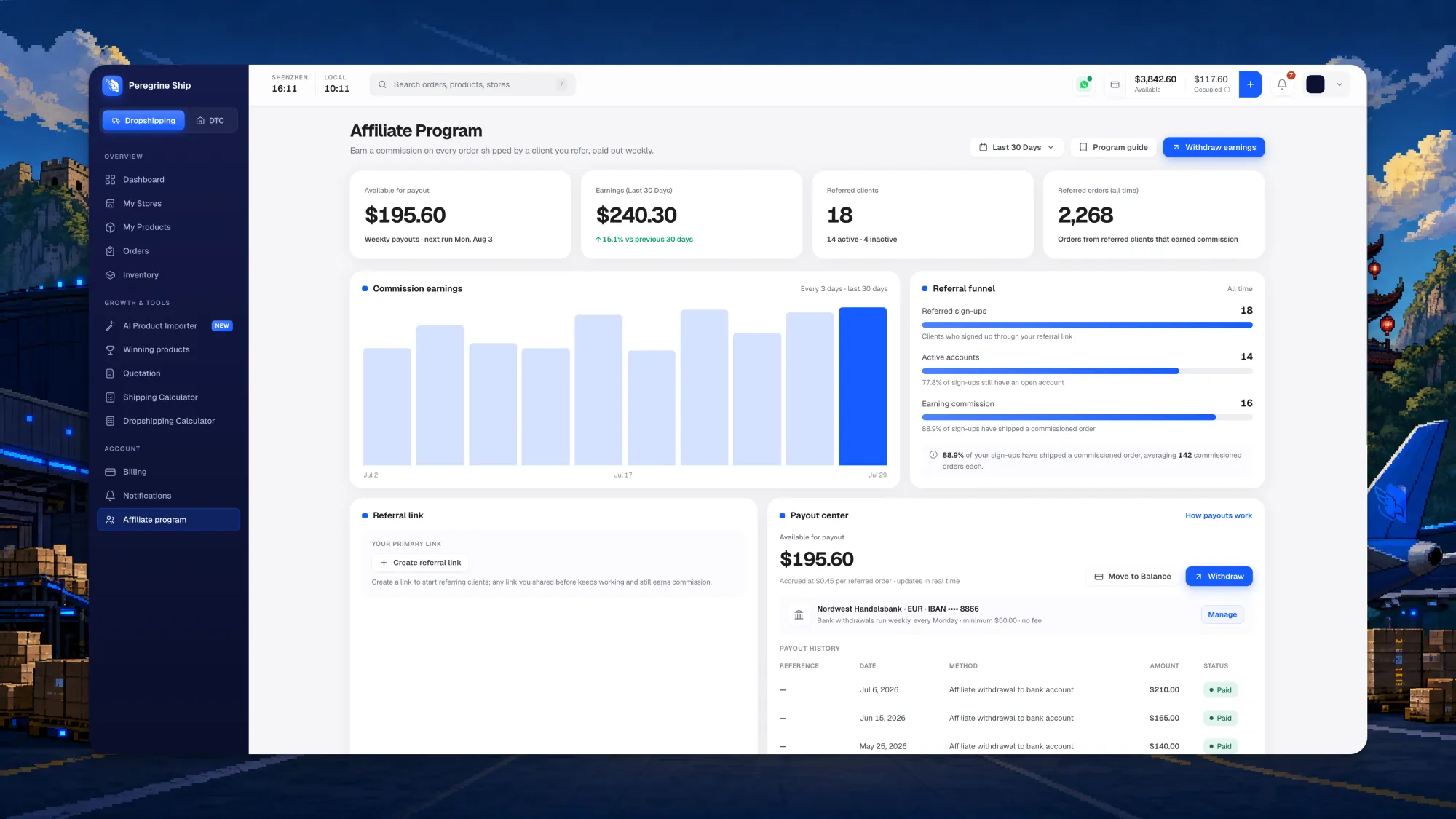
Available payout, earnings for the period, referred clients split into active and inactive, and referred orders all time.
The referral funnel is the useful addition: sign-ups, then active accounts, then accounts actually shipping commissioned orders, so you can see where referrals stall instead of guessing why a number came in low. The payout centre carries your bank details, the schedule and a full payout history with a status on every line. Details are on the affiliate page.
Tracking
Your customer never logs into Peregrine. The tracking page is the only part of our software they will ever touch, which makes it the only part that shapes what they think of your brand. It lives at track.peregrineship.com.
You choose what they see. Full-mile tracking shows the complete journey, both carriers, and every customs event, which is what you want when you are the one diagnosing a delay:
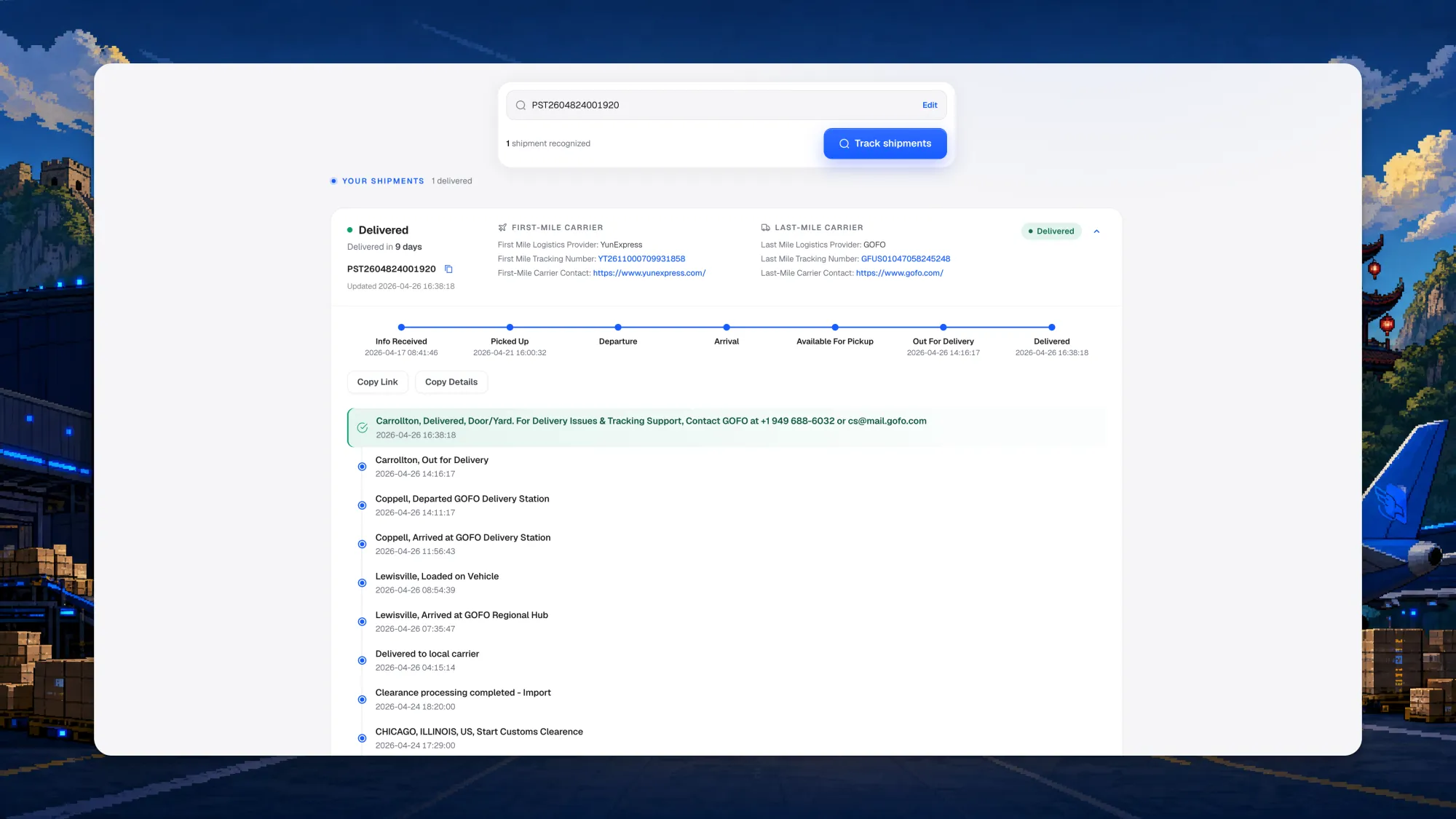
Last-mile tracking shows the same parcel as a domestic delivery. The first-mile carrier is gone, the customs events are gone, the origin is gone, and the timeline reads in plain retail language: order processed, shipped, in transit, at local facility, out for delivery, delivered. Your customer sees the local carrier they already trust finishing the job:
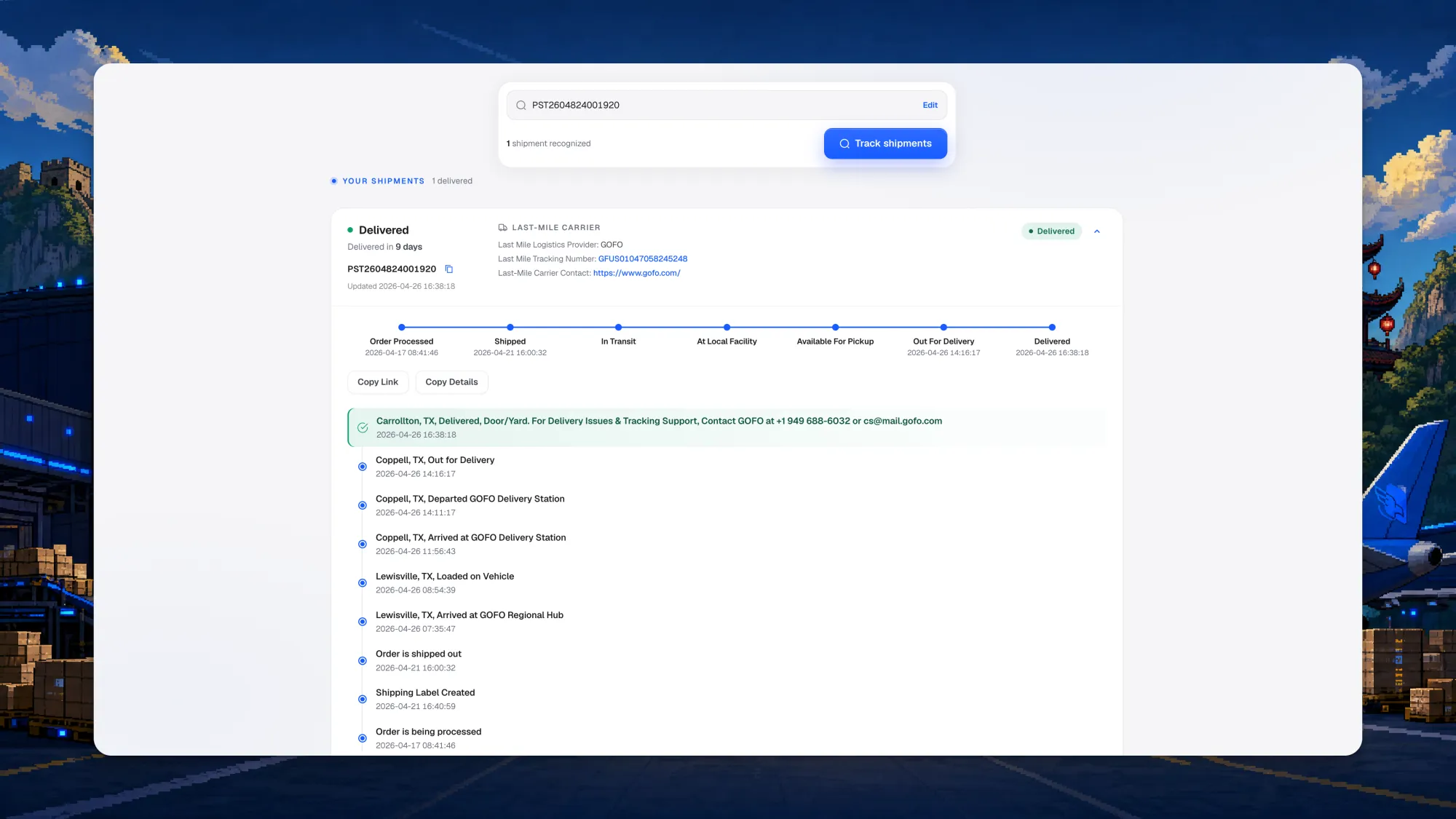
That is the whole promise of China-direct done properly, rendered in one screen. The product ships from where it is made, and the delivery experience reads like it came from down the road.
Three other things changed:
- It works on a phone. The old seven-step bar scrolled sideways on mobile, which is where almost everyone checks a parcel. It is a vertical timeline now, with a hero search that collapses into a compact summary once results load, and answer-first cards so the status is read first. Motion respects the reduced-motion setting.
- Up to 100 tracking numbers at once, for anyone checking a batch.
- Automatic carrier recognition, the largest single piece of engineering in that codebase: roughly 120 ordered matching rules across 55+ carriers, a 191-country national-post registry, and check-digit validation on international postal numbers so a bare string of digits is never guessed at blindly.
- AI 1:1 matching and prediction. A cross-border parcel changes identity at the border: the first-mile number goes quiet and a local number takes over. We built an AI layer that pairs the two one to one, predicts the last-mile number and its carrier as the handover happens, and recognises the carrier behind a bare string of digits. Your customer keeps one link that keeps working, and you stop fielding the message that starts with "my tracking stopped updating."
That last one is measurable. Measured against a production export of live orders, carrier recognition reached 97.8% coverage and agreed with 17Track's own attribution 99.5% of the time. A number that used to render as "Unknown" now names its carrier and shows a real journey.
Delivered events also flow back into the platform, so your dashboard matches what happened at the doorstep without anyone refreshing anything.
Publishing to your store
Publishing is a four-step flow: pick the store, set the options, confirm the names, review. It runs from a frozen snapshot of your saved quote, so the costs you approved are the costs it publishes against, with a live per-variant preview of landed cost against retail price before a single product is created.
Non-USD stores are handled properly. Sell in euros or pounds and conversion happens at the moment the product goes to Shopify, while your Peregrine costs stay in one currency underneath, so nothing silently reprices behind you.
Performance
- Built for volume. The order pipeline now targets 500,000 orders a day.
- More than 1,500 automated tests run against the platform before anything reaches you.
- Round-the-clock health monitoring, with independent signals and a real alerting path, so we learn a component is unhappy before you do.
Availability
The new platform is the default for every merchant, so logging in is the entire process. Stores, products, orders and balance carried across untouched. Support is on your dashboard and at support@peregrineship.com.
If you are not with us yet, the free plan is $0 a month with unlimited orders, zero setup fees, and a per-order rate that applies only when a parcel actually ships. Connect your store and the four-step setup handles the rest.
Frequently asked questions
What is new in the Peregrine platform?
Fifteen screens including dashboard, orders, inventory, products, stores, billing, notifications and affiliate views, AI inventory forecasting, a rebuilt Dropshipping Calculator, a tracking page with automatic carrier recognition and full-mile or last-mile modes, and a four-step publish-to-store flow.
Do I need to do anything to get it?
No. Log in as usual. Your stores, products, orders and balance carry across untouched.
How does AI inventory forecasting work?
It reads sell-through per SKU across your connected stores, learns the pace each product is moving at, and projects when it runs out, so a reorder point reaches you while there is still time to raise an inbound. Low stock and reorder alerts arrive through your chosen notification channel.
Can my customer see that the order shipped from China?
That is your choice. Last-mile tracking shows only the local carrier and a plain retail timeline, without the first-mile carrier, customs events or origin. Full-mile tracking shows the complete journey for when you need to diagnose a delay yourself.
What is the difference between Sync Products and Sync Backorders?
Sync Products pulls your Shopify catalog across so every SKU can be matched, quoted and sourced. Sync Backorders brings across orders still waiting on fulfillment, so connecting a store today does not strand the orders it took yesterday.
Does any of this change what I pay?
No. Plans stay Free at $0, Pro at $49 and Brand at $79 a month, sourcing stays factory-direct at 0% agent markup, and per-order rates apply only when a parcel ships.
The Drop
Five winning products every week. Real margins, real factories, ready to import.