Top up your balance
Card or bank, and why timing matters more than amount.
Two ways in
The + button next to your balance in the top bar, from any screen.
Top up balance on the Billing screen.

Both do the same thing.
Card or bank transfer
Card is instant. The balance is available as soon as the charge succeeds. Minimum $100, and a processing fee of 3.4% plus $0.30 is added on top of the amount you are crediting.
Bank transfer has no fee, which makes it the better option on larger amounts. The dialog shows the account details, and it is not instant.
We do not accept PayPal.
Use the payment reference shown. For a bank transfer that reference is how your money is matched to your account. Without it, it still arrives, but it has to be matched by hand and that takes longer.
Timing matters more than the amount
The single most useful thing on this page: bank transfers do not clear at weekends or on public holidays.
A transfer sent on Friday afternoon may not be spendable until the following week. If your busiest days are Saturday and Sunday, and your balance is funded by bank transfer, send it during the week.
Top up before you need it, not when an order is already waiting. An order that cannot be funded does not ship, and no amount of money in transit changes that.
What it costs
Card top-ups carry a processing fee of 3.4% plus $0.30, added on top of the amount you are crediting. Top up $500 and roughly $517.30 is charged to your card, with $500 landing on your balance. The dialog shows the split before you pay: amount, fee, total charged, and credited to balance.
Bank transfer has no fee. On anything sizeable that difference is worth the wait.
How much
Take Avg cost per order from the Billing screen, multiply by the orders you expect, and add headroom.
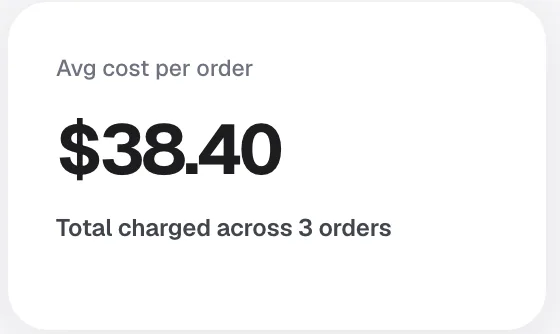
Add more before a launch, an ad push, or a weekend. Orders arrive when you are not watching, which is the point of the whole setup, and the balance has to be there when they do.
Check it landed
Open Billing and look at the Top-ups tab under Balance movements. Every top-up is listed with its date and amount.
If your Available figure looks lower than you expected, some of it may have moved to Occupied against orders that arrived. That is not missing money: seeAvailable and Occupied.
If it has genuinely not appeared, seeYour top-up has not landed. Do not send it twice.
Frequently asked
Is there a minimum? $100 on card. Bank transfer has no fee, so it suits larger amounts. How long does a card top-up take? It is instant once the charge succeeds. How long for a bank transfer? Longer, and not at weekends. PayPal? No. Can I get unused balance back? Yes, by bank transfer. Ask support. Can I set up automatic top-ups? Not today. Can I top up in a currency other than USD? Ask support before sending.
Still need help?
Real humans on every reply. Average response under 2 hours during business hours.