The Orders screen
Every tab, column and control on the busiest screen.
What it shows
Every order across every connected store, synced from Shopify and tracked through the pipeline.
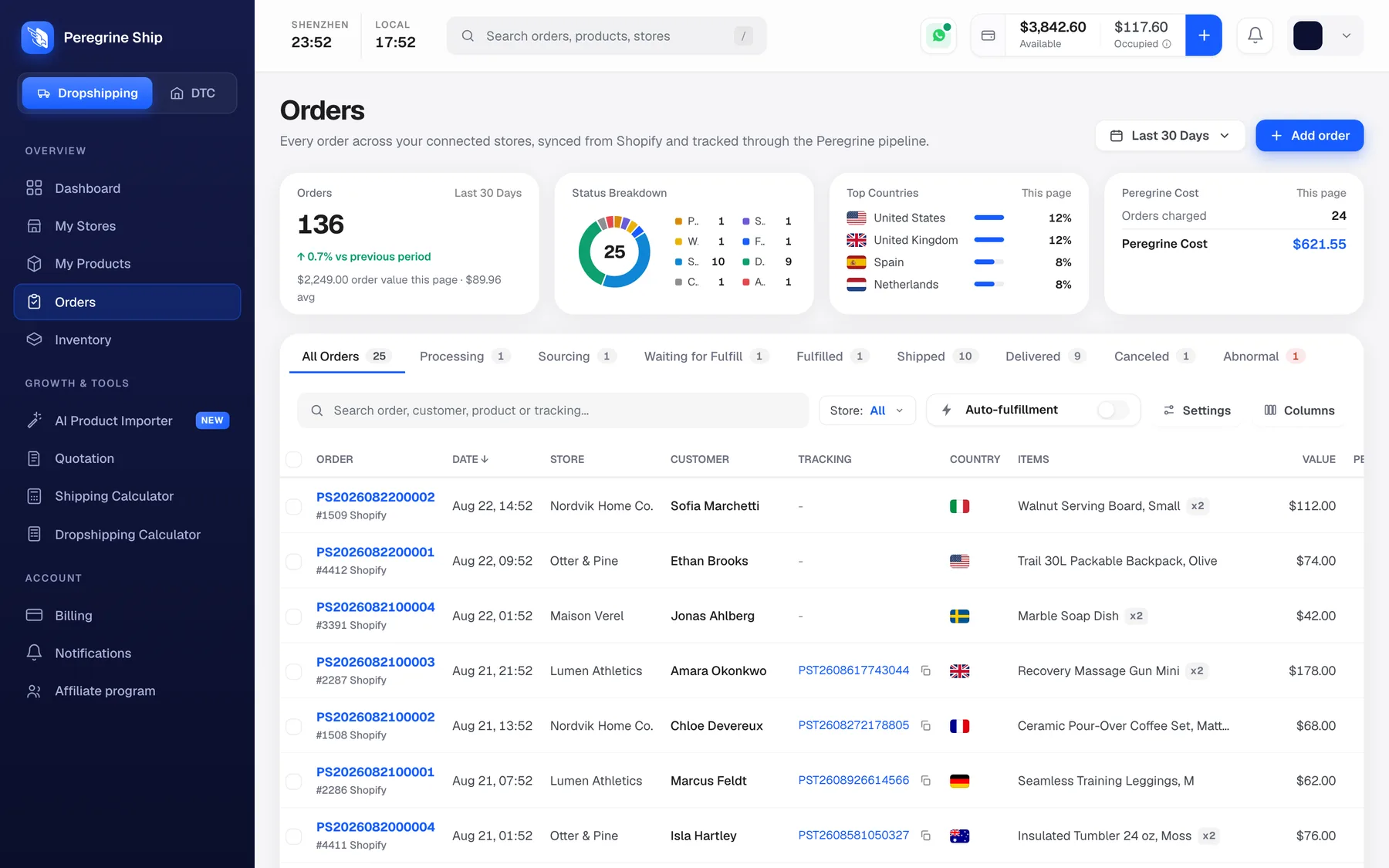
The four cards
| Card | What it tells you |
|---|---|
| Orders | Count in your date range, with the change against the period before |
| Status Breakdown | The same orders split by stage, as a donut |
| Top Countries | Where they are going |
| Peregrine Cost | What fulfilment cost, and how many orders were charged |
Note that some cards follow your date range and others describe the page you are looking at. Check the small label on each card before you quote a number from it.
The status tabs
Nine tabs: All Orders, then one per stage, each with a count. Clicking one filters the table.
See What each order status means. The one to check daily is Abnormal, because it is the only queue where nothing moves without you.
The table
| Column | Notes |
|---|---|
| Order | Our number, beginning PS, with your store's own order number underneath |
| Date | Sortable |
| Store | Which store it came from |
| Customer | Name |
| Tracking | The PST code once shipped, with a copy button |
| Country | Flag |
| Items | Product and quantity |
| Value | What your customer paid |
Two order numbers on every row is deliberate: ours for talking to us, yours for matching back to Shopify.
The controls
- Search across order number, customer, product and tracking
- Store filter, for multi-store accounts
- Date range, top right
- Auto-fulfillment, a toggle. It is off by default. See Auto-fulfilment
- Columns, to show and hide columns
- Add order, to create one by hand
- Settings
A two-minute daily routine
- Open the Abnormal tab. Deal with anything in it.
- Glance at Peregrine Cost against your balance.
- Ignore the rest. Orders in the other tabs are moving on their own.
Frequently asked
Why two order numbers? Ours and your store's, so you can match them. Can I export? Use Columns to set up the view you want first. My order is not here. See Orders are not reaching Peregrine. Can I see all stores at once? Yes, set the Store filter to All. Why is a count on a tab different from a card? Check whether the card follows the date range or the current page.
Still need help?
Real humans on every reply. Average response under 2 hours during business hours.