What each order status means
What each of the eight statuses means, and which need you.
Every order in Peregrine moves through the same eight states. The Orders screen puts each one on its own tab, so you can see the whole pipeline at a glance and click into any stage.

The short version:
| Status | What it means | Do you need to do anything |
|---|---|---|
| Processing | We have the order and are getting it ready | No |
| Sourcing | We are buying the item from the factory | No |
| Waiting for Fulfill | Item is here, parcel is queued to be packed | No |
| Fulfilled | Packed and handed to the carrier | No |
| Shipped | In transit, tracking is live | No |
| Delivered | Your customer has it | No |
| Abnormal | Something needs attention | Yes, read below |
| Canceled | The order will not ship | Depends, read below |
Six of the eight are simply the parcel moving. Two of them, Abnormal and Canceled, are the only ones that ever need you.
Processing
The order has arrived from your store and is in the queue. We are checking the address, the item and the variant against what you sell.
How long: minutes to a few hours.
What you see: the order appears with your store name and its original store order number next to it, so you can match it back.
When it moves on: to Sourcing if we need to buy the item, or straight to Waiting for Fulfill if your stock is already in the warehouse.
Sourcing
We are buying your item. This status only appears for products sourced on demand. If you hold stock with us, your orders skip it entirely.
How long: this is the stage that varies most, because it depends on whether the factory has the item on the shelf or has to make it. Restock from a factory runs 2 to 3 days after production finishes.
What you see: on the Billing screen, a matching line reading "Sourcing cost held". That is money set aside to buy the item, not money spent. See How your balance works.
If you want to skip this stage: hold stock with us. Orders against stock in the warehouse go straight to packing.
Waiting for Fulfill
The item is physically in the warehouse and the parcel is queued to be picked, packed and labelled.
How long: dispatch runs sub-24h.
What you see: nothing to do. This is the shortest stage for most orders.
Fulfilled
The parcel is packed, labelled and handed over. A tracking number is generated and attached to the order.
How long: the parcel usually sits here briefly before the first carrier scan lands.
What you see: a tracking code in the Tracking column, starting PST. Click the copy icon next to it to copy it.
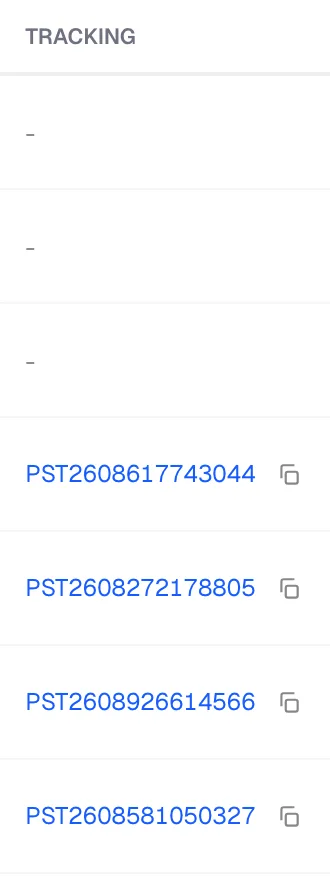
Important: a tracking number existing is not the same as the first scan existing. It is normal for a code to show no movement for a short window after it is issued. See Tracking has not updated.
Shipped
The parcel is in transit and tracking is live. Your customer can follow it.
How long: 3 to 10 days on our main lanes. Some destinations run longer. Check the country page for the lane you are shipping.
What your customer sees: the last-mile view only. It does not show the China leg. See What your customer sees when they track.
Delivered
The carrier has recorded delivery.
What you see: the order drops out of your active pipeline and into the Delivered tab. Nothing further is charged against it.
Abnormal
Something has stopped the order and it needs a human. This is the one status you should act on.
Common causes:
- The delivery address is incomplete or failed validation
- The item cannot be sourced at the price or spec quoted
- The destination is one we cannot serve on a normal lane
- A customs or carrier exception in transit
What to do: open the order and read the note on it. If the fix is on your side, for example a bad address, correct it in your store and tell us. If it is on ours, we are already on it and the note will say so.
Do not wait it out. An Abnormal order is not moving. Every day it sits there is a day your customer is waiting.
Canceled
The order will not ship. Either you cancelled it, or it was cancelled in your store and the cancellation synced across.
What happens to the money: any amount held against that order is released back to your available balance. You are not charged for an order that never shipped.
Can you undo it: ask support before placing a replacement, so you do not end up with two live orders for one customer.
Finding orders by status
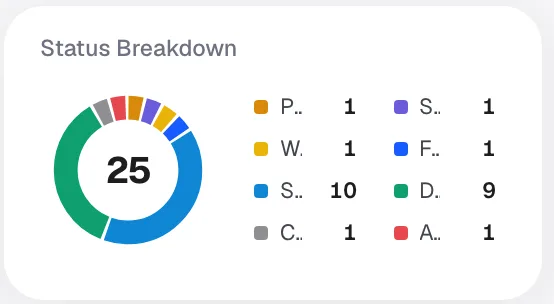
Each tab on the Orders screen filters to one status, and the number on the tab is the count in your selected date range. The donut on the Status Breakdown card shows the same split visually.
Three filters stack on top of the tabs:
- Date range, top right. Defaults to the last 30 days.
- Store, if you have more than one connected.
- Search, which matches order number, customer name, product or tracking code.
So "every Abnormal order in Germany this month" is three clicks, not a support ticket.
What your Shopify order says
Peregrine statuses and Shopify statuses are not the same vocabulary and they do not update in lockstep.
Your Shopify order marks itself fulfilled when we hand the parcel over and push the tracking number back. So a Shopify order reading "Fulfilled" means it left our warehouse, not that it arrived. The Peregrine status is the accurate one for where the parcel physically is.
Frequently asked
My order has been in Sourcing for days. Is that stuck? Not necessarily. Sourcing covers buying from the factory, and made-to-order items take longer than shelf stock. If it concerns you, check the order note first, then ask us.
An order skipped Sourcing entirely. That is correct behaviour. It means the item was already in the warehouse.
Two orders placed the same day are in different states. Normal. One is likely sourced on demand and the other is against stock you hold.
What is the difference between Fulfilled and Shipped? Fulfilled means we packed it and handed it over. Shipped means the carrier has it moving and tracking is live.
Still need help?
Real humans on every reply. Average response under 2 hours during business hours.