Your store disconnected, and the orders you cannot see
It fails silently. Nothing tells you. Here is how to check.
Why this one matters more than it looks
A disconnected store does not throw an error. Nothing turns red on your dashboard. Orders simply stop arriving, and because our numbers can only count orders we received, a gap looks exactly like a quiet day.
That is the part to understand. You will not be told. You have to look.
Most people find out when a customer asks where their parcel is, three days after the order was placed.
Check it
Open My Stores. Every store shows a badge.
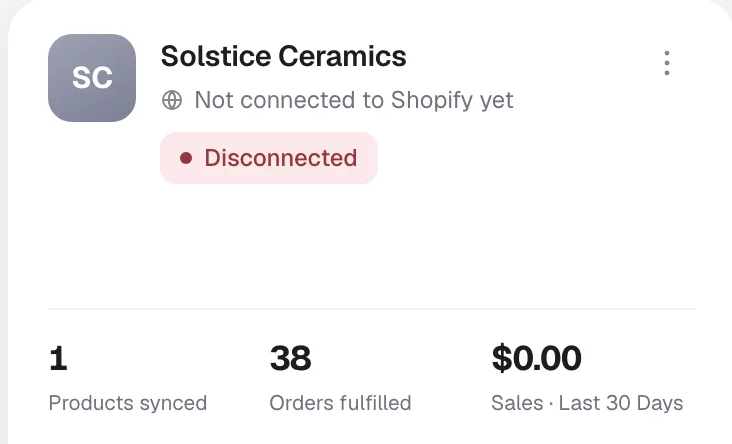
Connected means orders are flowing. Disconnected means they are not.
Filter to Disconnected at the top of the page to see only the problems.
Why a store disconnects
- The Peregrine Ship app was uninstalled or removed in Shopify
- Permissions were revoked, often while tidying up apps
- The store was added here but the connection was never finished
- Shopify changed the app's access, usually alongside a plan or ownership change
Almost always a change on the Shopify side, and almost always accidental.
Fix it, then recover what you missed
Step 1. Reconnect. Open the store card, reconnect, and confirm the badge turns green.
Step 2. Press Sync Backorders. This is the step people skip, and it is the one that gets your orders back.

Reconnecting restores the flow from now on. It does not go back and collect what arrived while the connection was down. Sync Backorders does.
Yes, it is safe. It looks for orders that never imported and brings them in. It does not re-import orders you already have, and it does not re-ship or re-charge anything that already shipped. If you are unsure whether you missed anything, press it. The cost of pressing it needlessly is nothing.
Step 3. Check the gap. Open Orders, set the date range to cover the outage, and compare against Shopify for the same window. Anything still missing, send us the order numbers.
Step 4. Deal with the delay. Orders recovered late are still late. If the gap was more than a day, tell those customers before they ask you.
Orders missing while the store says Connected
Different problem, different cause. Work through these:
- Is the order paid? Unpaid and pending-payment orders do not import.
- Does the product exist in Peregrine? Open My Products and look. If it is not there, press Sync Products.
- Does the product have a SKU? Matching is on SKU. A blank or duplicated SKU has nothing to match against, and this is the most common cause by a distance.
- Is the destination one we serve? Turkey and the Canary Islands have no line. Northern Ireland ships only on a separate channel.
- Still missing? Press Sync Backorders, then send us the Shopify order number.
Make it a habit
There is no automatic alert for a disconnection today, so build the check into your routine.
- Look at My Stores after any change to your Shopify apps or permissions. That is when it happens.
- Glance at it each morning. Two seconds, and it catches the failure that costs the most.
- If a day looks unusually quiet, check here first, before you conclude your ads stopped working.
Frequently asked
Will I be emailed if a store disconnects? Not today. Check the badge.
Does the disconnected store's history disappear? No. Existing orders and products stay. Only new order flow stops.
How far back does Sync Backorders reach? Press it and check the recovered orders against Shopify. Send us anything still missing.
Can I press Sync Backorders more than once? Yes. It will not duplicate orders.
One store of four is disconnected. Are the others affected? No. Each store connects independently.
Still need help?
Real humans on every reply. Average response under 2 hours during business hours.