
Investigate the same product fault across several orders
Open one coordinated investigation while preserving the order, delivery time and evidence for every affected item.
On this page
Use with AI
Three complaints about “a broken zipper” can concern a common product fault, damage in transit or different sizes from different batches. Collect consistent evidence for each shopper before concluding that the whole batch is affected.
- Affected order
Exact store order, Peregrine reference, SKU, affected quantity, parcel and delivery date.
- Observed fault
Comparable photographs or a short video of the same failure point and the packaging condition.
- Shared source if known
Inbound, batch marking or approved sample associated with those units. Record unknowns explicitly.
Record each delivered item
For wrong, damaged or defective goods, send the evidence within 48 hours of delivery for each affected shipment. Open the merchant case promptly while further reports are investigated. Keep a row per order with its delivery time, exact SKU, number of units affected, parcel tracking and the condition of the outer pack. Ask for a clear view of the whole item, the affected point and the relevant label.
For example, two medium navy bags with the same seam failure and intact cartons form a more specific lead than a list that simply says “three damaged bags.” A third bag with a crushed carton belongs in the investigation with its own evidence.
Ask the team to check stock and open orders
Send the affected references, any shared batch marking or inbound, and the approved specification or sample. Identify the records whose batch is unknown. Ask the team to inspect the relevant remaining stock and confirm whether affected open orders can be held. Record the actual response, inspected quantity and instruction for the next pick.
Keep any shopper refund in the selling channel and any agreed replacement or merchant credit on the associated fulfillment case. Verify which order has received which remedy.
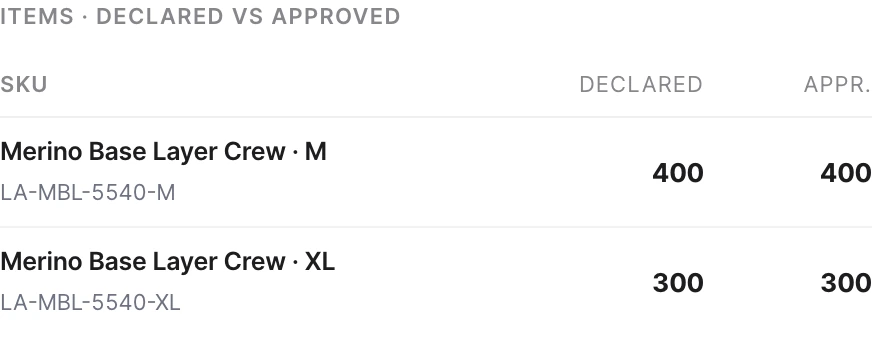
If you can identify the inbound, compare its exact variant and received quantity with the affected run. Include the carton identification separately.
Common questions
Can I wait to see whether more customers report the fault?
Report the affected delivered item with its own evidence promptly. Add later cases to the linked investigation as they arrive.
Can photos from one customer stand in for the others?
They can identify a pattern. Each affected order still needs its own reference, quantity, delivery date and available evidence.
Is the rest of the stock automatically on hold once I send a message?
Ask for confirmation of the stock, batches or open orders covered by any hold. A sent report establishes that you raised the issue.