
A parcel has tracking in Peregrine but Shopify still shows no link
Check the store, affected fulfillment and permissions before asking for a tracking correction.
On this page
Use with AI
Start from the parcel that actually shipped. Find the order under the right store in Orders and open Tracking. Write down the assigned reference and the items and quantities in that parcel.
- Peregrine order
Confirm the store, shipped variant, quantity and assigned tracking.
- Shopify fulfillment
Find the fulfillment containing the same lines and check which number is attached.
- Buyer notification
Once tracking is correct in the store, check the customer-facing link and notification.
Check the store record
- Open the same order in the correct Shopify store. Identify which fulfillment contains the packed lines. Orders served by several locations can have several fulfillment records.

Match the physical lines and assigned location in Shopify to the fulfillment you are investigating.
Shopify admin · Development storeView full size - Compare the tracking shown on that fulfillment with the Last mile tracking only setting in your Peregrine account. The setting covers all connected stores and applies from the next fulfillment. Check whether the parcel already has a local number and whether the Shopify fulfillment itself exists.
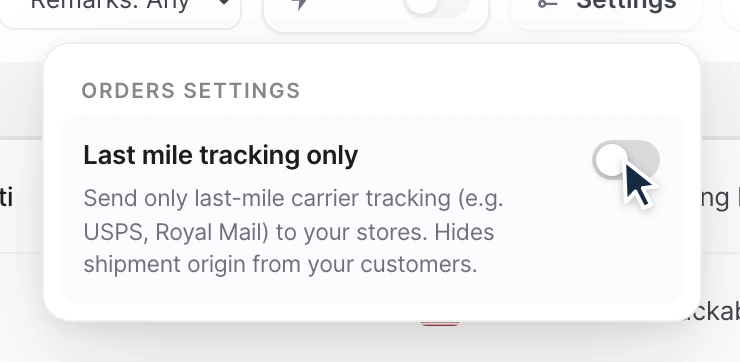
Check the account-wide tracking mode, then compare the local number with the individual fulfillment in the correct Shopify store.
Platform screenshot · Example dataView full size - Check My stores and any pending Shopify permissions. If the account owner needs to approve an update, complete it through the normal store connection and verify its state.
- If a confirmed shipment is still missing, send support both order references, the affected lines, carrier tracking and a cropped view of the Shopify fulfillment. Ask for a check against the existing shipment.
Check the notification separately
When the number appears on the correct Shopify fulfillment, open the link. If the buyer still reports receiving no email, check the store's notification history, recipient address and template settings. Shopify's order-status page and an email already delivered to a buyer are separate records. Shopify tracking guidance
Common questions
Should I import the order again to push tracking?
First identify whether it was already fulfilled and which Shopify fulfillment needs updating. Recreating a shipment can duplicate the operational work.
One product is fulfilled and another is still waiting. Which one do I report?
Send the precise variant and quantity in the parcel whose tracking is missing. The other location or unshipped items may have their own later fulfillment.
The carrier link is wrong in both systems. What next?
Get the confirmed number for the actual parcel and request a tracking correction on the existing fulfillment.