
Resolve a missing carton, wrong size or partial receipt
Reconcile the domestic waybill with the actual accepted SKU quantities, then report the specific discrepancy once.
On this page
Use with AI
A shipment can reach the warehouse with only some units approved. One carton may still be in transit, a size label may disagree with the packing list, or some units may be held for inspection.
Open the inbound and match the tracking reference and SKU before reading the declared and approved quantities.
Read transcript
- Choose Inbounds to see the shipments recorded for the warehouse.
- Open the received inbound with the tracking reference you want to check.
- Find Items · Declared vs approved and match the SKU.
- This SKU shows 400 units declared and 400 approved at receipt.
- Find the gap
Open the inbound by domestic waybill. Match the three-unit difference to a carton and exact variant.
- Check the labels
Compare the latest factory packing list with carton and item labels. A separately shipped carton may still have another waybill.
- Ask for a decision
Request the warehouse’s accepted count and location of the missing or held units. Keep a corrected packing list with the case.
Reconcile one waybill
- Open Inventory → Inbounds. Search for the domestic tracking number and open the matching shipment.
- In the drawer, scroll to Items · declared vs approved. Read Appr. on the line for each SKU and compare it with the original factory packing list. During a partial receipt, the amount still awaiting approval can change, so keep the original dispatch count. Identify the store, variant SKU, size/color and carton number for the gap. Check whether other cartons have separate waybills.
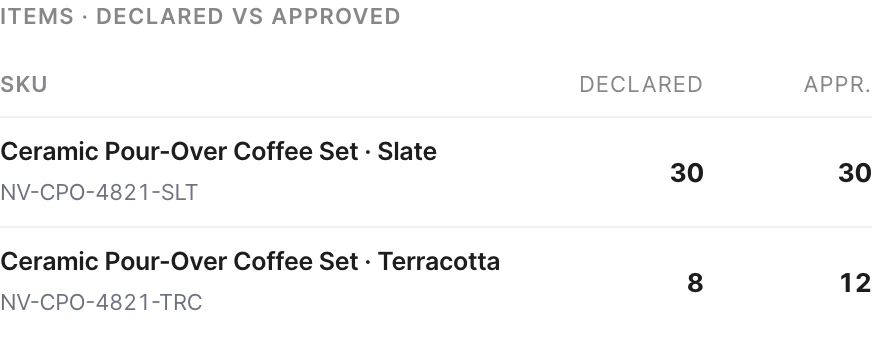
Compare Appr. with the original factory line. The second SKU here has 12 approved while its remaining declared amount is eight.
Platform screenshot · Example dataView full size - Send support the packing list, the affected line, the carrier's delivery date and photos of the outer label or product label if available. If the factory corrected its list, include both versions and identify the change.
- Ask which units were physically received, which were accepted, and which are still held or expected. Recheck the same inbound and variant after the correction.
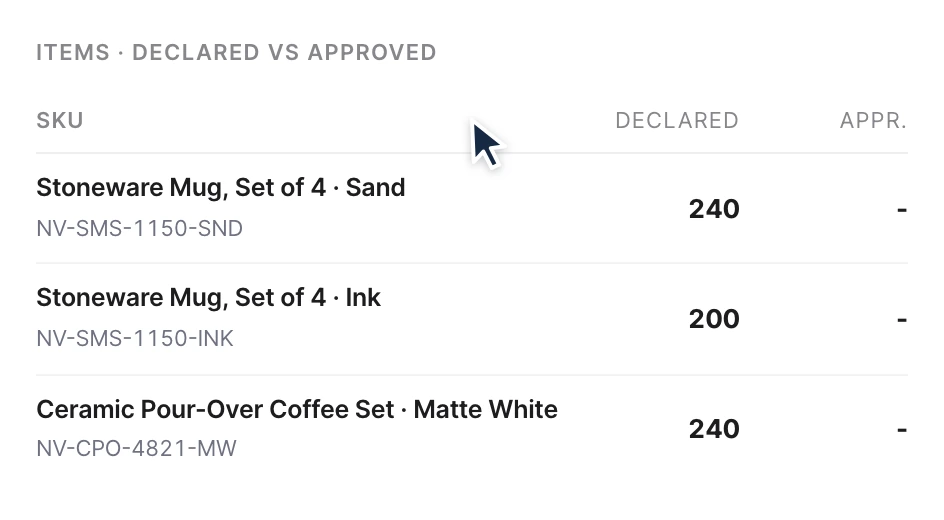
Read the declared and approved columns on the same SKU. All three lines here have declared units, and the approved quantities are still blank.

Illustration. Separate the colors, confirm whether one sale unit is a pair, pack or piece, then record the actual count for each SKU.
A worked example
If a carton declares one EU 43 and the label inside reads EU 40, crediting either size before inspection can leave another order short. Keep the pair on the original waybill, identify both sizes and wait for the warehouse's labeled count.
Common questions
Should I create the missing units as a second inbound?
Only separately dispatched goods with their own waybill need another record. Resolve a counting or labeling difference against the existing shipment.
Can I ship the rest while one line is held?
Ask which exact variants have been accepted and are available to the relevant orders. A receipt total alone cannot confirm allocation.
Does the detail screen explain every shortage?
It shows recorded quantities and status. Ask for the inspection findings when the numbers alone do not establish what happened.