
Find the right delivery carrier to contact
Read the carrier contact, destination number and general postal fallback on the public tracking page before opening a delivery enquiry.
On this page
Use with AI
Open the parcel's tracking link and expand its number. Delivery help is the place to check who can assist with local delivery. A postcode or a country alone does not identify the carrier handling this parcel.
- Named delivery carrier
Use its published contact and destination tracking number.
- General postal link
Ask the store to confirm the actual carrier.
- Carrier to be confirmed
Trace the Peregrine reference through the merchant.
Use the strongest available contact
- If Delivery help names a carrier and gives a Carrier tracking number, copy that number. Use the official support link shown, and have the latest scan date and relevant delivery postcode ready.
- If it offers general postal help and says your store can confirm the carrier, treat that as a general information route. Ask the selling store to identify the assigned carrier before opening a parcel-specific claim.
- If it says Carrier to be confirmed or the carrier number is missing, give the selling store the Peregrine tracking number. A merchant can open the original Orders → Tracking and give support both available references.
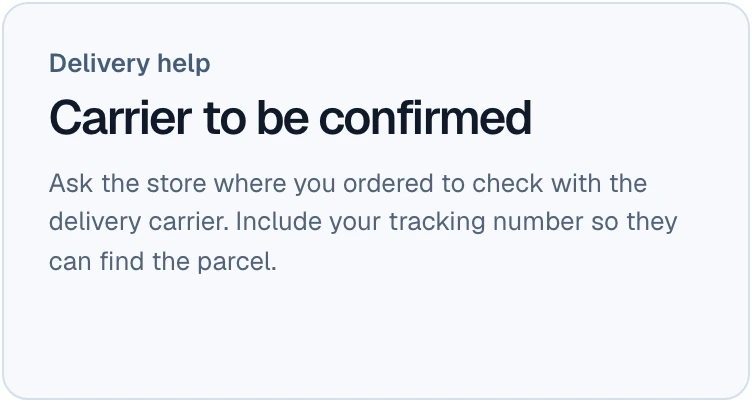
When Delivery help says Carrier to be confirmed, contact the selling store with this parcel’s tracking number instead of guessing a destination carrier.
Platform screenshot · Example dataView full size - If the carrier says the sender must open the enquiry, send its case number and last event to the selling store. The merchant can continue the trace with Peregrine.
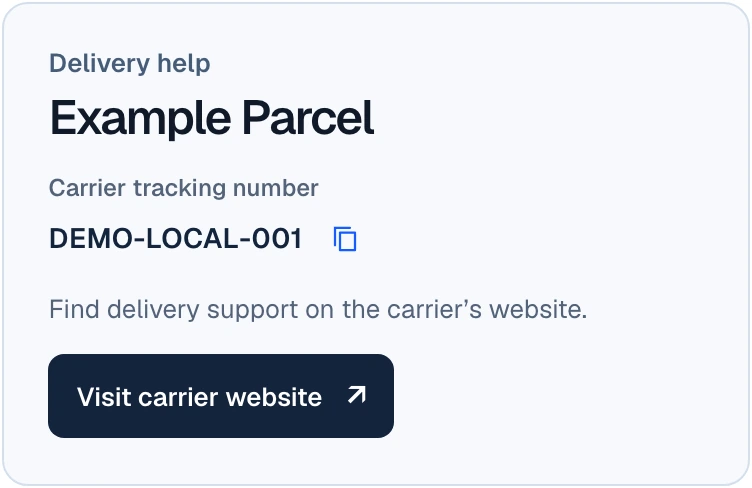
Read the named carrier and copy its Carrier tracking number. Here the example carrier offers a website for delivery support.
Common questions
Can I give the carrier the store order number?
Start with its carrier tracking number. Keep the store order number for the merchant so they can match the sale to the shipment.
Why is a different company shown on an earlier scan?
The carrier responsible for the first transport leg can differ from the destination delivery service. Match the contact to the question being investigated.
What should I provide publicly?
Send parcel-specific details through the carrier's official help form or the selling store's private support channel. Keep delivery addresses, contact numbers and proof-of-delivery images out of public comments.