
Follow a parcel after its destination tracking number changes
Keep a record of the retired and current numbers and confirm which local history belongs to the current delivery.
On this page
Use with AI
A destination carrier number can be replaced while the Peregrine shipment reference stays the same. Old scan screenshots and carrier emails can still refer to the previous number. Establish the replacement before treating this as a second parcel or a completed delivery.
- Previous local number
Keep its screenshot and date as historical evidence.
- Current local number
Verify the assigned carrier, parcel and most recent scan.
- Peregrine reference
Use it to connect the original order to the verified delivery.
Match the current delivery leg
- Reopen the original Peregrine order, confirm the shop, contents and Peregrine reference. Record the Last mile value currently shown under Tracking.
- Open its public link and compare Delivery help → Carrier tracking number with the old number. Record both numbers and where and when each was seen.
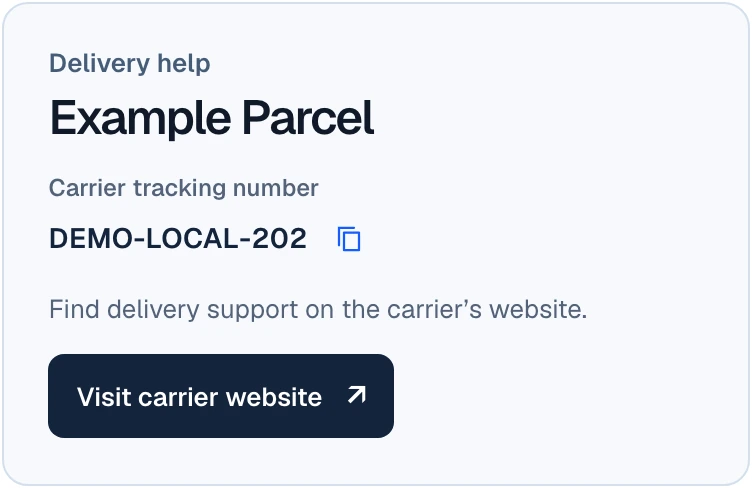
The example public record currently lists DEMO-LOCAL-202. Record the old and new references for your actual parcel and compare the current number with the merchant drawer and Shopify fulfillment.
Platform screenshot · Example dataView full size - Verify whether the records represent one relabeled parcel or two separate physical boxes. If unclear, ask support to confirm the current assigned number and which scans belong to that delivery.
- Give the shopper the verified current link. If the original Shopify fulfillment still contains a retired number, coordinate a tracking correction on the existing fulfillment.
For example, an old label's Delivered scan dated before the replacement number was issued cannot by itself establish delivery under the newer label. Match the recipient, parcel and current carrier evidence before closing the case.
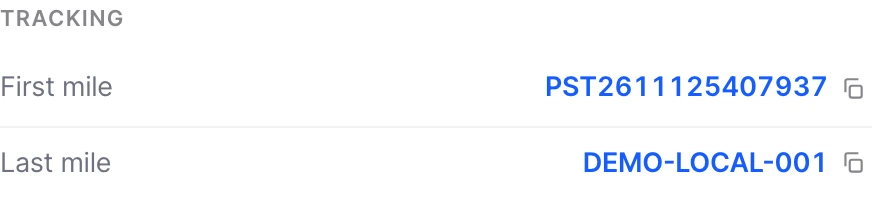
Read the current Last mile reference in the merchant order and compare that exact number with the customer-facing record.
Common questions
Does a new local number mean a replacement product was shipped?
A number change alone cannot tell you how many goods left the warehouse. Verify parcel contents and dispatch records.
Should I combine the old number's delivery scan with the new number's empty page?
Keep the histories separate while support confirms the relationship. Preserve the dates of both.
The customer's old email cannot be changed. What can I send now?
Send a current verified link with a brief note that the destination reference changed. Check the live store order page separately.