
Work through today’s dropshipping orders
Separate sales waiting for a decision from orders already moving, and leave each buyer with the right update.
On this page
Use with AI
Start with orders where the warehouse or sourcing team is waiting for you. A paid Shopify sale, a sourced unit and a parcel received by a carrier can be at three different stages on the same morning.
- Waiting for your answer
Open the order, read the affected SKU and reply to the actual question.
- Accepted and in progress
Check the latest state and whether the team has requested a change.
- Shopper asking for delivery news
Open the linked parcel and use its latest dated event.
Clear decisions before checking totals
- Open Dashboard and read orders need your attention, when present. It covers all stores. Select an order and read Action needed. Copy the order reference and the exact variant before answering.

Select the affected order in the dashboard attention panel to read what the warehouse needs.
Platform screenshot · Example dataView full size - If the requested size is unavailable, confirm whether you want a wait, a specific replacement offered by sourcing, or a review of other options. Specify which open order the decision covers. An unexplained “yes” can leave two variants in play.
- For Not enough funds, open Billing and compare Available with the order requirement. Check for an existing pending top-up before starting another. Reopen the original order to see whether the hold cleared.
Check the sales expected from your store
Choose the correct store in Orders and look up a paid sale by its store order reference. If it is absent, verify the store, fulfillment location and eligibility in Shopify before creating a separate order. If it is present, use the Peregrine record to see whether sourcing, warehouse work or dispatch is next. Find a missing Shopify order
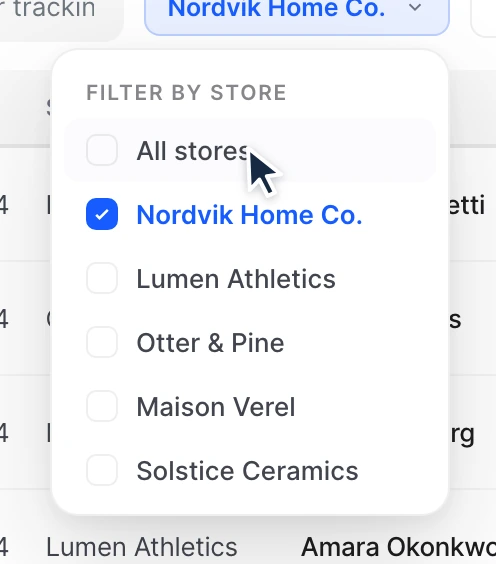
Choose the shop that took the payment before searching for its order number. Two stores can use the same number.
Close a buyer enquiry with a specific fact
Open the parcel linked to the correct order. A label alone supports “tracking has been assigned.” A dated carrier acceptance supports “the carrier has received it.” If two parcels belong to the sale, send the relevant link for each affected item. Keep an open question with its order reference and a person responsible for following up.
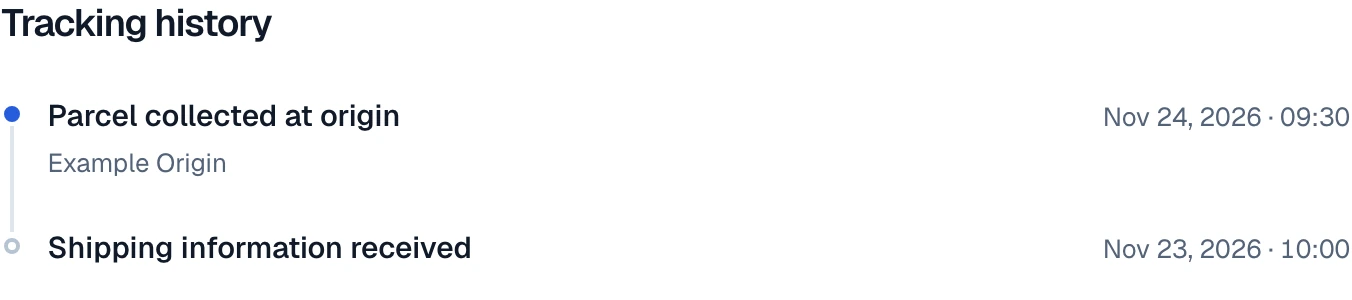
Use the date of collection for a carrier handoff. The earlier electronic notice records when the shipment information was created.
Common questions
What should I check first each morning as a dropshipper?
Open urgent order issues first. Check the exact variant and decision on each affected order, then check which paid sales from your store reached Orders. Before answering a buyer, open that order’s parcel and read the most recent event.
I chose one store but the Dashboard still shows a problem from another. Should I change that order?
Read the store name on the order. The attention area and wallet cover the account. Store-specific activity uses the selected store and date range.
Is marking an alert as read enough to release an order?
Reading updates the notification. Answer the issue and check the order again for its new status.
Which number should I give my shopper?
Use the tracking link on the appropriate Shopify fulfillment or the customer-facing parcel link. A sourcing-request reference or your wallet transaction number cannot track a parcel.