
Find the right company or shipment document
Get the company terms, locate a billing document or request paperwork tied to a specific shipment.
On this page
Use with AI
Peregrine Group Limited is the company named in the platform's terms. Choose a document based on whether you need to establish a company relationship, confirm a payment or show the contents of a particular shipment.
- What did we add to the wallet?
Find the posted top-up under Billing → Top-ups and invoices and open its PDF if available.
- What reached the warehouse?
Compare your carton packing list with receiving evidence for that inbound.
- What terms did we agree?
Use the signed service agreement and published terms. Request a copy if needed.
Match the document to the question
| What you need to establish | Where to start |
|---|---|
| The company providing the platform and its published terms | Read the Terms of Service. For personal data handling, read the Privacy Policy. |
| Money added to your Peregrine balance | In Billing → Top-ups and invoices, match the posted top-up by date and amount. Choose PDF if an invoice is available. |
| Goods or delivery charged to one order | In Billing → Balance movements → Charges, find the order reference. Cost type distinguishes sourcing from shipping. |
| A plan approved in Shopify | Check the Shopify bill for the store that approved the app subscription. |
| A carton or SKU discrepancy | Collect your packing list, carton tracking and expected quantities. Ask support for the receiving evidence for that inbound. |
| A contract, company verification or shipment-specific document | You can request the business registration certificate or a formal service agreement. For shipment paperwork, tell support which document the receiving party needs, any required fields or deadline, and the relevant account or shipment reference privately. |
If a destination authority requests a commercial invoice for a physical parcel, give support the parcel reference and the document requirements. A wallet top-up invoice documents the money added to your Peregrine account.
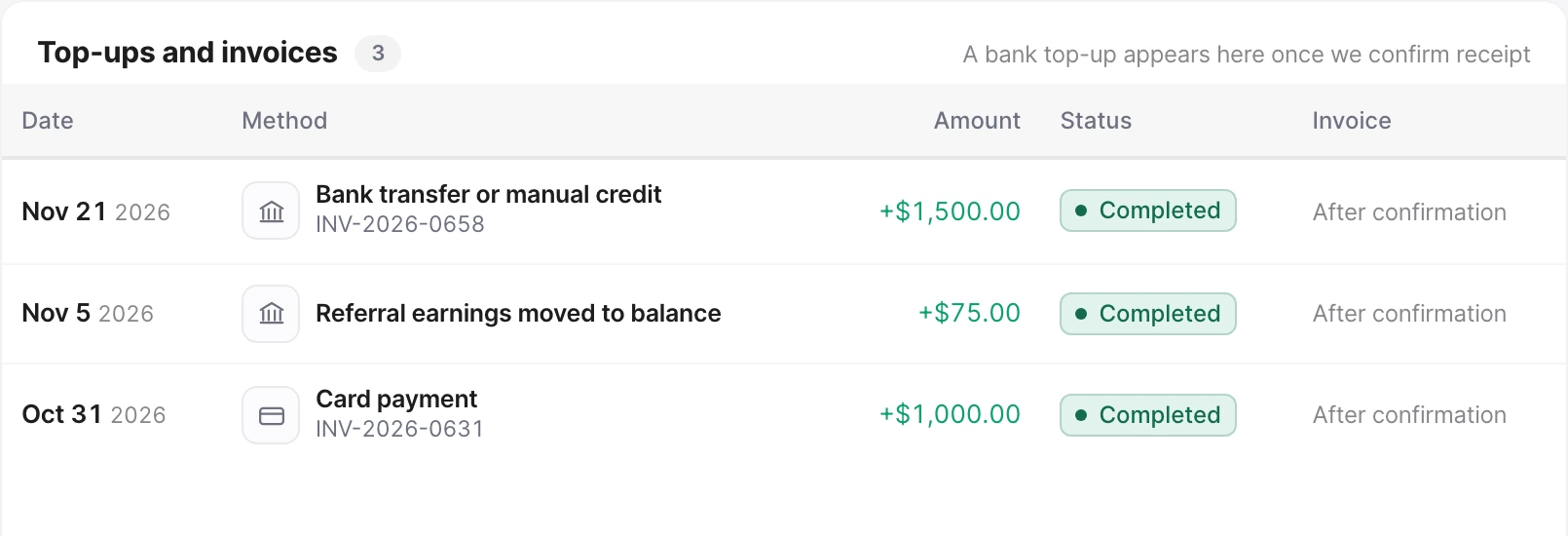
For money added to the wallet, match the posted payment in Top-ups and invoices before asking for its document.
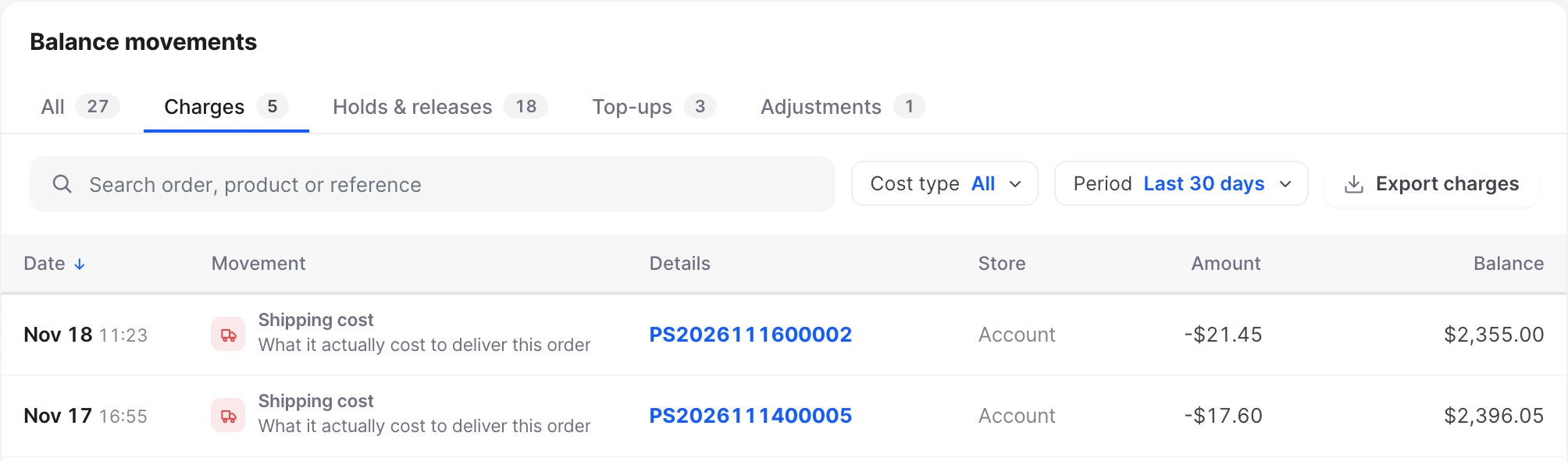
For an order charge, open Balance movements and choose Charges. Use Cost type to narrow the order rows. The top-up document lives in the separate invoices table.
Common questions
Where can my finance team find an old receipt?
For a posted top-up, check the posting date under Billing → Top-ups and invoices and open the matching row. If you need an invoice and there is no PDF, give support the transaction reference, date, currency and amount.
Can I use a help article as evidence of an agreed service term?
Use the current published terms, your signed agreement and the specific quote or written confirmation for that service. Support can help locate the applicable document.
What if I need the warehouse delivery address for a new inbound?
Get the current receiving instructions for your store and planned shipment. A company contact address on a website is unsuitable for routing cartons.