
Run a daily stock and dispatch check for a DTC brand
Check the variants that can ship today, the cartons still in receiving, packaging shortages and the orders affected.
On this page
Use with AI
Begin with orders your team can unblock today. Use Dashboard for current exceptions, Inventory for the exact variant and Orders for the affected customer. A style-level total can look healthy while the size that sells fastest is already unavailable.
- Unit missing
Compare the ordered SKU to the received and available quantity.
- Packaging missing
Check usable packaging count and the approved hold or substitution rule.
- Packing complete
Check the parcel reference and first carrier scan before describing dispatch to the shopper.
Separate received, available and expected
Open the variant for the correct store. Record the quantity available for new work and any stock already committed. Check the inbound for stock still on the way. If a supplier sent 30 units and the warehouse shows 18 received, keep the other 12 against the inbound until someone verifies their receipt. Read stock by variant
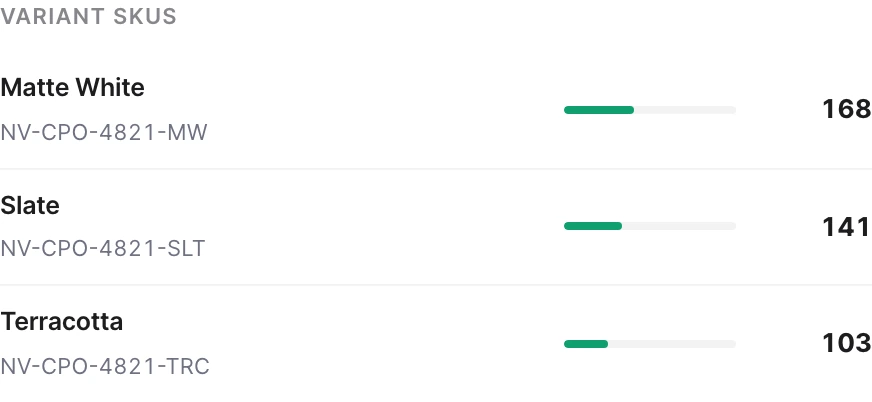
Read the on-hand amounts by finish. One product total can conceal the SKU that is about to run out.
Work the exception queue in order
- Read the original order’s Action needed and identify the exact line. Check whether the shortfall is product, packaging or a decision about the recipient.
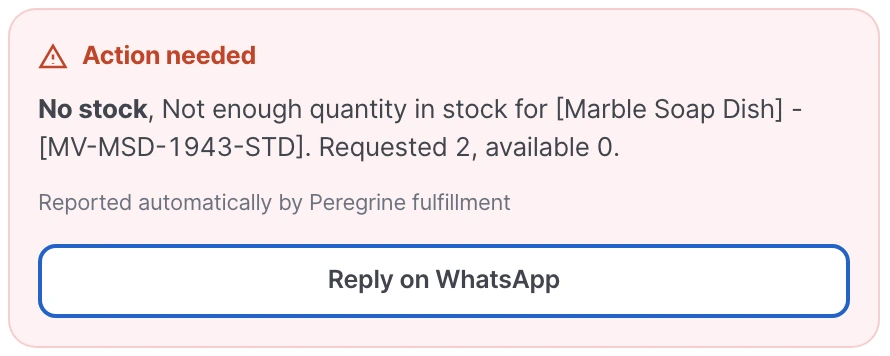
Read the SKU and the requested and available quantities in Action needed before deciding how to handle the order.
Platform screenshot · Example dataView full size - For a receiving discrepancy, send the inbound reference, carton identity, expected count and warehouse count for that SKU. If another size has a surplus, list it separately.
- For a packaging shortage, follow the agreed rule. If the team needs a decision, distinguish orders that may ship in neutral packaging from orders that must wait.
- Before reporting dispatch, check the parcel assigned to the order and the carrier’s latest dated scan. If a marketplace or customer-service team needs an update, give them the appropriate shopper link.
Close the loop at shift change
Save a small exception list showing the store, order or inbound, SKU, missing quantity, next owner and what would resolve the case. On the next shift, close a receiving issue against the corrected line and a shopper issue against its actual order. One update does not automatically settle the other.
Common questions
How do I find out how many units of one size can ship today?
Find the SKU for the right store, color and size in Inventory. Compare its available balance with the quantity already committed. Open any incoming shipment separately to see what is expected and what receiving has approved. A style’s total across sizes cannot answer this question.
We hold the same garment in two brands. Can the other brand’s stock cover the order?
Verify ownership, variant and any authorized allocation with the team. A similar name, size or appearance is insufficient to identify an available unit for that order.
Our replenishment will arrive tomorrow. Should I tell customers their orders have shipped?
You can communicate the expected replenishment stage. Confirm usable receipt, packing and carrier handoff before describing their parcel as shipped.
All products are available but one order is still held. What next?
Read the order reason and last warehouse remark. The issue can concern funds, recipient details, another component or an agreed packing rule. Reply against the existing order.