
Add a warehouse instruction to one order
Save a remark, find it again and get confirmation when it changes what can ship.
On this page
Use with AI
A warehouse remark belongs to one Peregrine order. Use it for a precise instruction the team can identify, such as “Hold the navy medium until I confirm the size.” Include the variant when several lines look similar.
Open the row menu and write a specific packing instruction. The sample stops before Save.
Read transcript
- Use the actions menu on the order that needs the instruction.
- Choose Add remark.
- Write the exact packing detail for the warehouse.
- Review the instruction and order number before choosing Save.
Write and verify the remark
- Open Orders, find the order and choose the three-dot Order actions button at the far right of its row. Choose Add remark or Edit remark.
- Type the instruction in Warehouse instruction and choose Save.
- In the filter above the table, open Remarks: Any, choose With remarks, then reopen the saved remark. This verifies the text on the order.
- For an urgent hold, an address change, a substitution or a parcel combination, contact support privately. Ask for confirmation from the team handling the physical order.
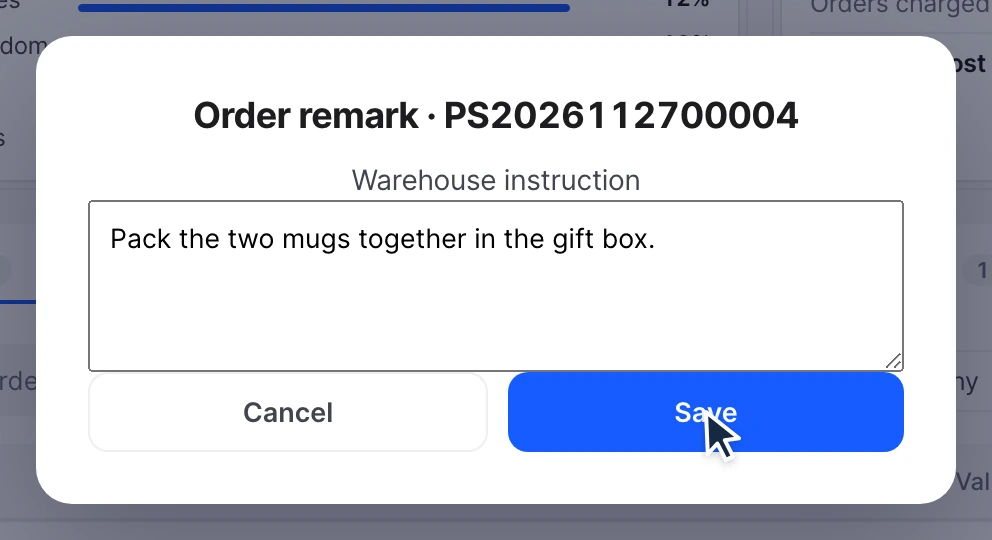
Write the instruction against this order and select Save. The example tells the warehouse how to pack the two mugs.

Return to Orders and choose With remarks to locate a saved instruction for review.
When another operator also edited it
If the editor says the remark changed, cancel the editor, refresh the order and read the latest instruction. Combine the intended updates before saving again so one person's note is not lost.
Common questions
Does a saved remark mean the warehouse has acknowledged it?
A saved remark confirms what the order record says. Ask for acknowledgment before promising a time-sensitive change to a shopper.
Can I tell the warehouse to substitute any similar size?
Name the precise approved variant and quantity. If the shopper has not agreed, request a hold while you confirm.
Will this change every future order of that item?
The remark belongs to the selected order. Discuss a recurring packing specification or product change separately.
My colleague already changed this remark. How do I keep both instructions?
If saving reports that the remark changed, cancel the stale edit and reopen the order. Read the latest instruction, resolve any conflict with the colleague, then save the agreed wording and reopen it to check.