
Resolve “No stock” on the exact order variant
Use the warning’s requested and available quantities to find the missing units or agree a replacement.
On this page
Use with AI
On Dashboard, find the orders that need attention and choose View all. In the resulting Orders list, select the affected order number. Under Action needed, read the product name, SKU, requested quantity and available quantity as one line.
In the walkthrough, MV-MSD-1943-STD is a Marble Soap Dish. The order requests 2, and 0 are available. Adding stock to a similar soap dish would leave this order short.
- Stock received
Check the approved quantity for this SKU and its allocation.
- Stock in transit
Match the expected inbound and ask when receipt will be checked.
- Sourced variant
Confirm exact availability or agree the substitute before packing.
Choose the matching case
- You own stock and an inbound already exists. Open Inventory → Inbounds, select the shipment reference, then match the SKU and read its approved units. Send support the inbound reference if the receipt shows the variant but the order still reports zero.
- The goods are still coming. Give support the expected inbound and ask what will trigger the next check. Tell the shopper which item is delayed.
- The item is sourced per sale. Ask for availability of the exact variant. If a replacement is suggested, approve its specific size, finish, quantity and any price difference before packing.
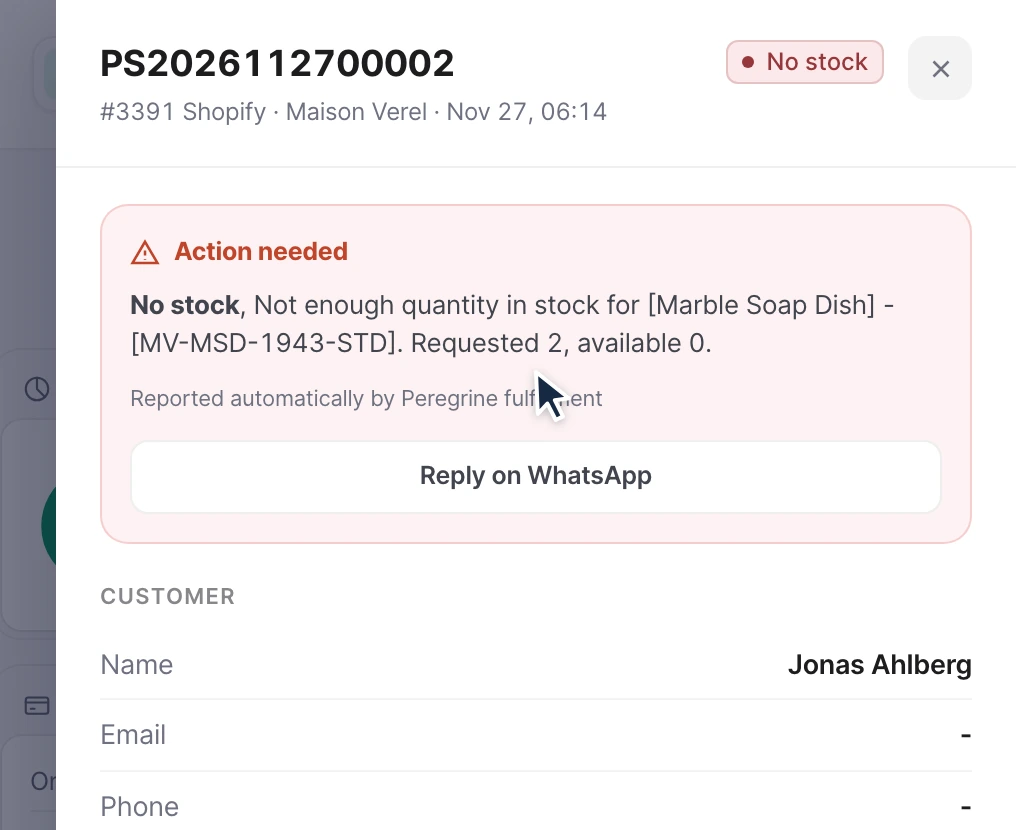
The order’s Action needed box names the item, SKU, requested count and available count. Match that exact SKU in Inventory.
Common questions
Can a neighboring size fill the shortage?
Only use another size after the shopper has accepted that substitution and the merchant and warehouse agree which SKU should ship. Keep the decision on the original order.
How do I know it is resolved?
Reopen the same order and check its current stage. If a stock receipt and the warning disagree, send both references and ask whether another order already committed the units.