
Ship a DTC order from stock you own
Verify that the exact variant was received and that the order is drawing from your inventory.
On this page
Use with AI
Your store can sell a navy jacket while the warehouse has twenty black jackets and no navy ones. Start with the variant the shopper bought.
- Order
Navy jacket, size M, two units.
- Inventory
Find that exact SKU and its approved receipt.
- Order stage
Release an eligible waiting order or resolve its stated stock issue.
Match the sale to the shelf
- In Orders, select the order number and scroll to Items. Copy the option, SKU and quantity from the matching line and compare it with the sale in Shopify. Keep its Shopify and Peregrine references together.
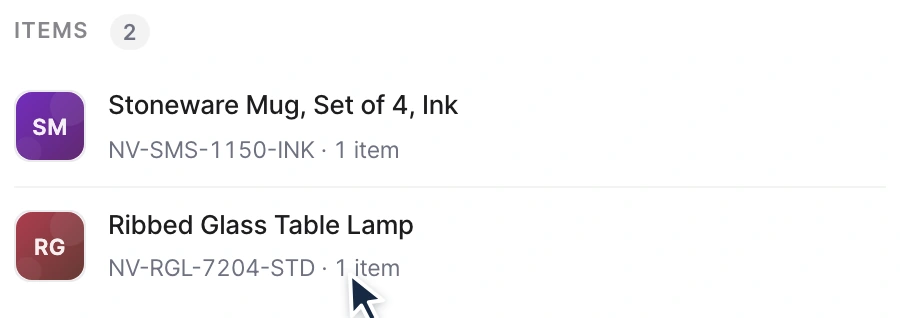
Read the order-line SKU and quantity before matching the variant against received warehouse stock.
Platform screenshot · Example dataView full size - Open Inventory → Products. Expand the product and check the matching variant row. If you expected a recent delivery, open Inventory → Inbounds and compare its declared and approved units for that SKU.
- Open the order again. Waiting for fulfill has a Fulfill now button at the bottom of the drawer when you are ready to release it. For No stock, send the exact order line and inbound reference to support. Ask how many units can be allocated to this order.
A switch to the DTC workspace changes your view. When a product was previously sourced per sale, confirm its saved stock and billing setup before releasing the first sale from your own goods.
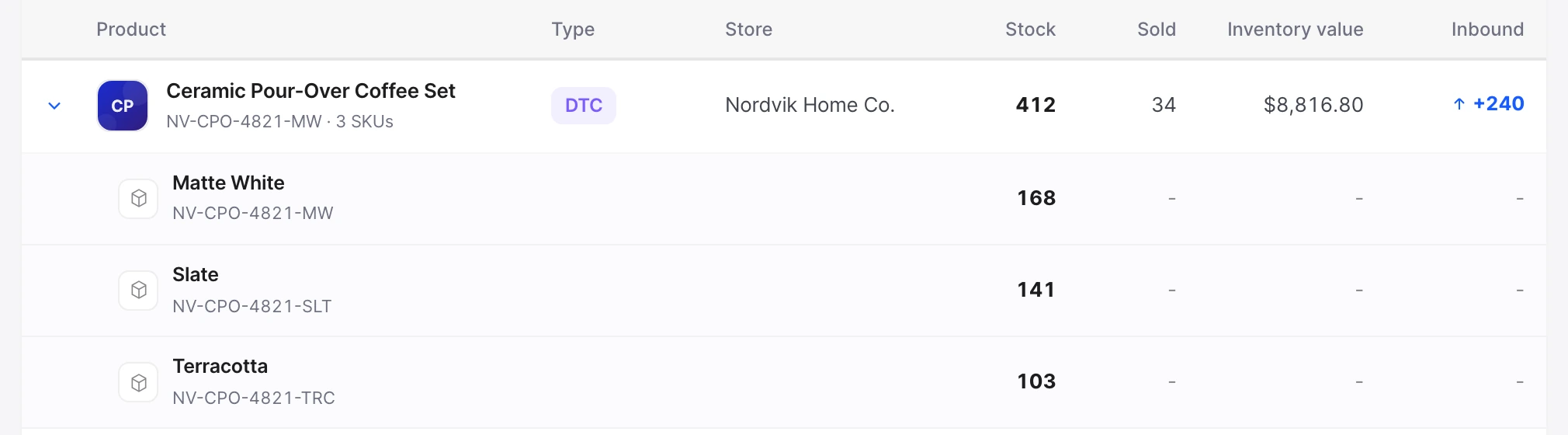
Read the size or finish at its own SKU row. An aggregate stock balance cannot establish that the ordered option is available.
Common questions
The product total is positive. Why could my order still be short?
The product can include several colors or sizes. The relevant figure is the exact variant and the units available for this order after earlier commitments.
I supplied these units and see a goods charge. What proves the issue?
Open the Billing movement, then collect its amount and order reference, the order's exact SKU and the inbound showing approved receipt. Ask support to compare the charge with the saved product arrangement.