
Check a Shopify payment or fulfillment hold before releasing stock
Identify whether the buyer’s payment, the Shopify fulfillment group or the Peregrine wallet needs attention.
On this page
Use with AI
A Shopify sale can show Paid while one fulfillment group remains On hold. Peregrine can also show money On hold in Billing. Check the screen that owns the particular hold before asking anyone to release it.
| Where you see it | What to inspect |
|---|---|
| Shopify order payment | Authorized means payment details were validated. Paid means the payment was captured or marked as received. Verify the amount and follow your store's payment policy. |
| Shopify fulfillment group | Read the hold reason, affected items and the person or app responsible. A second group in the same order can have a different status. |
| Peregrine Billing | Open Holds & releases and match the reservation to its order. Read the order drawer separately for any stock or fulfillment issue. |
- Payment
Check captured or received funds and your store policy.
- Shopify fulfillment
Read the reason on the affected group.
- Peregrine wallet
Match the reservation movement to its order.
Read or release a Shopify hold
In Shopify → Orders, open the sale and find the affected On hold fulfillment section. Check its items and reason. To place a manual hold on an eligible unfulfilled group, use the dropdown arrow beside Mark as fulfilled and choose Mark as on hold. Select the affected items and reason, then confirm with the separate Mark as on hold button. Cancel leaves the group unchanged.
For an eligible manual hold you have resolved, Release hold acts immediately when it is the only hold. With several holds, select the ones you resolved, then choose Release. If an app placed the hold, check with that app before overriding it. Shopify fulfillment holds
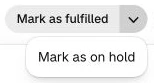
Use the arrow beside Mark as fulfilled to find Mark as on hold for an eligible group.
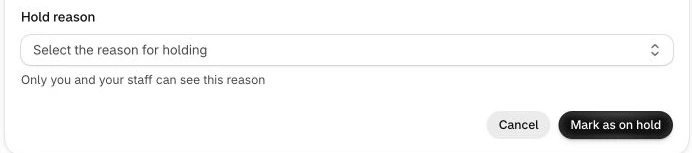
Shopify asks for a hold reason. Cancel exits the review. Mark as on hold confirms the selected hold.
If fulfillment has already started
Give support the store, Peregrine order number, affected SKU and reason for the Shopify hold. Ask whether sourcing, packing or handoff has already occurred before assuming a Shopify change can stop physical work.

If a fulfillment already exists in Peregrine, check its current stage before asking for a pause or cancellation.
Common questions
I released one Shopify hold. Why is a group still blocked?
Open that particular fulfillment group and check for additional holds or a different responsible app. Shopify fulfillment holds · Shopify order statuses