
Sell one physical SKU through two Shopify stores
Verify both storefront variants and their intended warehouse stock before relying on cross-store availability.
On this page
Use with AI
Your UK and US shops both sell a navy medium shirt. Even when the printed SKU is the same, each shop has its own Shopify listing and variant reference. The warehouse still needs one unambiguous physical item to pick.
- Shop A
Record its variant reference, SKU and unit size.
- Shop B
Record the corresponding variant and any packaging differences.
- Warehouse
Verify the matching stock pool and allocatable quantity.
Prove the mapping for both shops
- Open the product in each Shopify store. Record each shop's domain, product and variant link, exact option and SKU. Account for any difference in pack size, barcode or labeling.
- In Peregrine My stores, confirm each shop is connected. In My products, open the catalog product and inspect Published to to see which store listing is published. Separately compare the exact variants with the stock record. A publication status alone does not establish that the two listings consume the same units. Give support both variant references and the warehouse SKU or receipt you believe they should use.
- Ask whether both sales channels draw from the same received units and how available quantities are reflected in each shop. During a low-stock period, keep the storefront offers within the stock you can actually allocate.
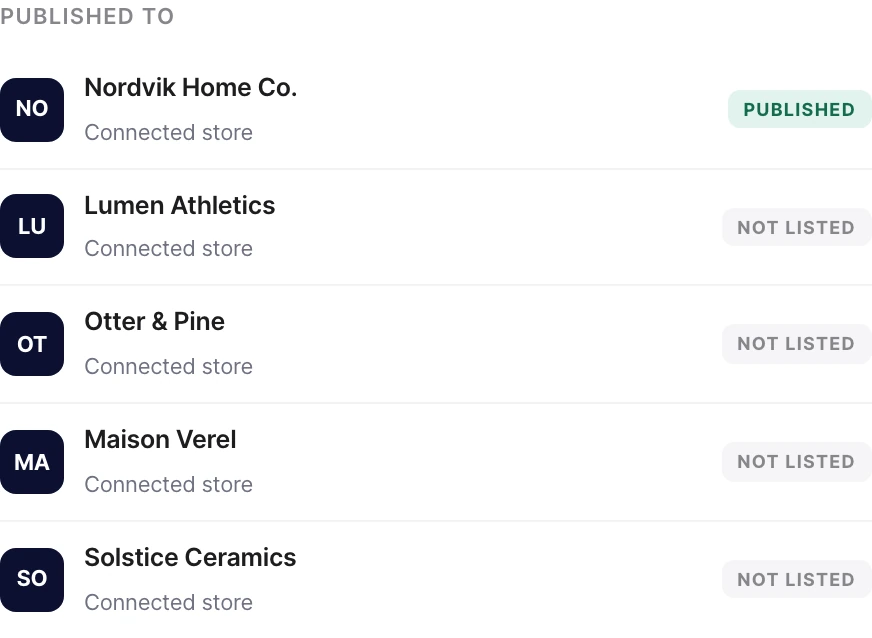
Published to identifies where the catalog product is listed. Verify the physical SKU and order routing for each shop separately.
Common questions
Both shops show four. Does that mean I have eight physical shirts?
Count the approved warehouse units for the exact SKU and confirm how they are shared. Storefront displays can refer to the same physical stock or different allocations.
Only one store's sale is blocked. What should I send?
Use that store's domain and sale number, the sold variant link, the Peregrine stock warning and the receipt for the expected SKU. Include the other shop's variant as a comparison. A shared product title is insufficient to establish the link.