
Export inventory with the sizes and colors you need
Load the variants you want before exporting, then distinguish product totals from the variant rows beneath them.
On this page
Use with AI
The Inventory → Products export contains the product rows shown on the current page. It adds variant lines for products whose variant details have loaded. A file with only a product total may be missing the size or color you need.
Expand the products you need before exporting. The download contains product totals and the loaded variant rows.
Read transcript
- Expand the stocked product whose variant SKUs you want to export.
- Wait for the variant rows to load. Each one has its own SKU.
- Choose Export at the top of Inventory to download the CSV.
- The sample download contains the product total and the three expanded SKUs.
- Collapsed product
The current page can export the product total without the individual sizes.
- Loaded variants
Expand the specific product and wait until the variant SKUs and counts appear. Then select Export.
- Another page
Open the next results page and repeat. Verify the expected size and SKU in each downloaded file.
Export a stock check
- Open Inventory → Products. Set your search and stock filter. Check the number of results and choose an appropriate Per page value.
- Select the chevron at the far left of each product whose sizes or colors you need. Wait until the variant names and quantities appear. Retry any failed row before exporting.
- Select Export. Open the CSV and check for the expected SKU and variant labels beneath each product.

Choose Export beside Create inbound while Products is selected. A separate CSV downloads for the rows and loaded variants you selected.
Platform screenshot · Example dataView full size - If the selection spans further pages, repeat for those pages. Use the product rows for totals or the variant lines for a size breakdown. Adding both double-counts the same stock.
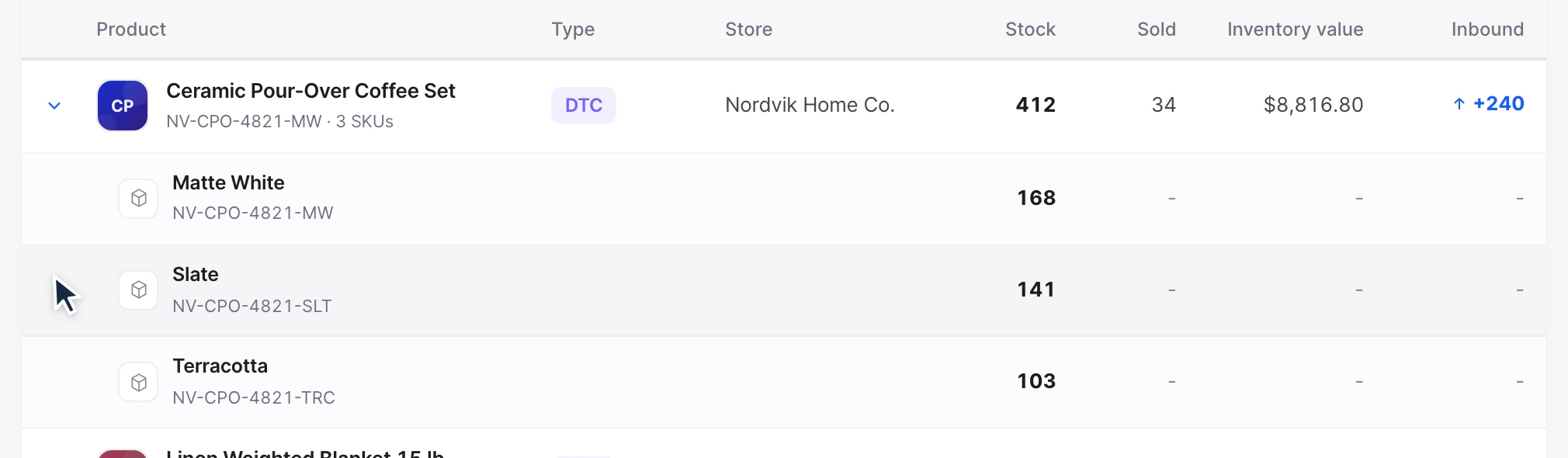
Expand the product before exporting. The product total is followed by Matte White, Slate and Terracotta, each with its own SKU and stock.
Need incoming cartons instead?
Switch to Inbounds, set the search or status filters and export that view. Its rows summarize shipments by tracking number, including units awaiting approval and units approved. Keep the separate carton packing list if you need piece-by-piece evidence.
Use the waybill register instructions when you need units awaiting approval and approved units for each shipment.
Common questions
Why is the variant sales figure empty when the product has one?
The export places sales, inventory value and cover on the product row. A blank variant-level metric does not mean the variant sold zero units.
Does On demand in a CSV mean there are unlimited units in the warehouse?
It identifies the sourcing model. Use a measured stock count only for a stocked variant with a reported quantity.
Which export should I send my warehouse contact to investigate a shortage?
Include the inbound reference and affected SKU. A product stock export shows the current view. The inbound record and carton list explain what was expected from a particular delivery.