
Find a factory shipment in the inbound register
Search a waybill or exact variant, clear the status filter and distinguish similar shipments before reporting one missing.
On this page
Use with AI
Open Inventory → Inbounds when you need to find stock coming into the warehouse. Orders follows parcels leaving for shoppers.
- Reference
Compare the domestic waybill on the label with Tracking in the inbound drawer. Preserve its leading zeroes.
- Shipment
Check the ship date and named destination. The same factory may have sent several batches of the same item.
- Contents
Match at least one expected variant SKU and its packing-list quantity before treating it as the right record.
Find the matching row
- Set Status to All. Paste the domestic tracking number into Search products, SKUs, inbounds… above the table. If it was copied from a spreadsheet, compare it with the printed label and check the leading zeroes.

The sample waybill is in the search field. Open the row with that same number to check shipment and variant details.
Platform screenshot · Example dataView full size - If the label is unreadable, search by variant SKU, product title or variant name. The shop name is useful for checking results after the search.
- Open the candidate row. Match Tracking, Ship date, Destination and one or more SKUs. A common product can appear in several shipments to the same address.
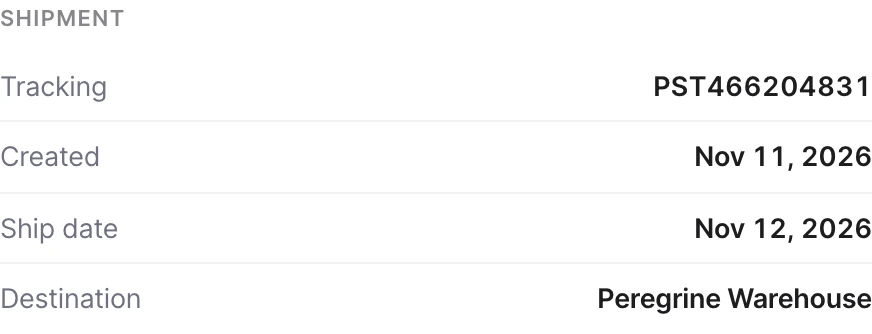
Open the candidate row and compare Tracking, Ship date and Destination with the factory label.
If the shipment is still missing
Get the carton-label photo, dispatch date and the SKU breakdown. Ask the person who filed the inbound which store they selected and whether they saw Inbound created. Give support the factory tracking and the attempted submission time before filing again.
Common questions
Does a purchase order number find the carton?
The register matches the domestic tracking reference and product or variant text. Ask the factory which label number traveled with the cartons.
Why does a shop search return no results?
Use the waybill or product information in search. The Store column helps you identify the resulting shipment and can show more than one store where its recorded lines have different associations.
Can two rows show the same tracking number?
Check the dates, destination and item breakdown on both. Give support both rows when they seem to describe the same physical dispatch. Do not add the quantities together until the match is clear.