
Plan a crowdfunding or preorder fulfillment wave
Turn pledge counts into a variant and destination breakdown, then verify stock before releasing customer parcels.
On this page
Use with AI
Start with the reward a backer is meant to receive. One pledge may contain several components, and one reward tier can have multiple sizes or add-ons. The pledge total alone cannot tell the warehouse what to pack.
- Ten rewards sold
Ten backers each expect one tee, one insert and one accessory.
- Only eight inserts received
Check exact tee sizes and accessory counts. At most eight complete rewards can be packed from those inserts.
- Which orders to release
Agree which eight orders are ready or whether to hold the wave for the rest.
Build a small packing matrix
| Example reward | What one backer receives | What changes the estimate |
|---|---|---|
| Apparel reward | One tee in the selected size and color | Size-level stock, packed weight and destination |
| Gift bundle | One tee, one accessory and one signed insert | Counts for each component, insert availability and packed carton size |
| Extra accessory | One additional unit on the same pledge | Whether it fits the original carton or requires another parcel |
Use your actual reward definitions. Agree each sale unit and what to do if a component is missing before stock arrives.
Sequence the first wave
- Give the team counts by variant and destination, any battery or other special contents, packed measurements or a representative sample, target dispatch window and number of expected cartons.
- Open Inventory → Inbounds, search the factory waybill, and click the matching row. Under Items · declared vs approved, compare Appr. for each reward component with its original packing-list line. Confirm the quantities received before committing to release the wave.
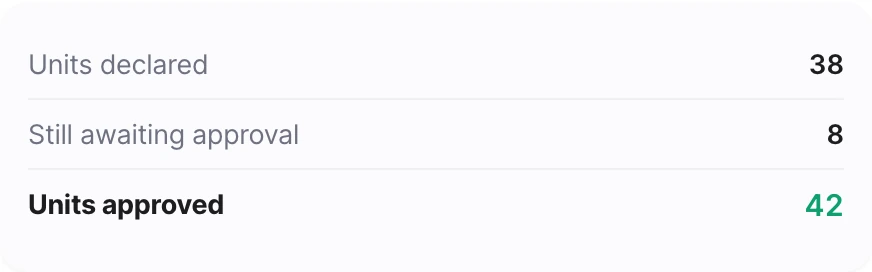
Compare approved and outstanding units before a wave is released. One received component can still be short in a particular reward.
Platform screenshot · Example dataView full size - Agree the order handoff and final private address collection. If the campaign system has no supported store connection, confirm the handoff with merchant support before submitting a batch.
- Release only the approved orders. Match the dispatched parcel count and tracking back to the sold reward quantities.
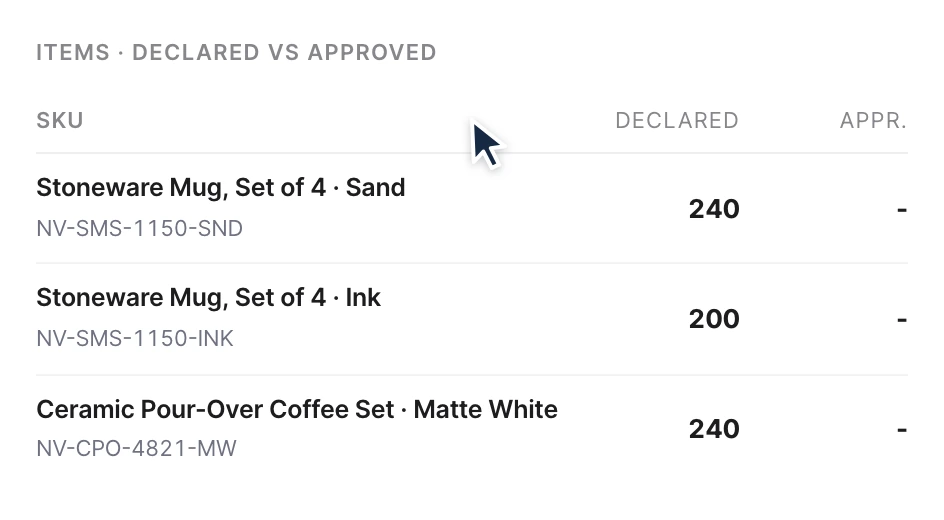
Before committing to a wave, compare every declared SKU with the approved quantity. A dash means this example does not yet show an approved count.
Common questions
Can I quote an entire campaign from its headline pledge count?
Break down reward tiers, add-ons, destination mix and packing configuration. The same number of pledges can generate different quantities and parcels.
When should I close address changes?
Agree a cutoff against the specific packing schedule. Confirm changes reached the operational order before labels are used.
What if the factory delivered all shirts but the inserts are still missing?
Identify which rewards need the insert. Confirm whether to hold only those orders or approve a different packing instruction before dispatch.