
Correct a submitted inbound without duplicating stock
Resolve a mistyped waybill, wrong size, incorrect unit count or uncertain submission against the original shipment.
On this page
Use with AI
If the wizard is still on Review, use Back and correct it there. Once it shows Inbound created, find the existing inbound before opening another one for the same cartons.
- Still on Review
Use Back. Correct the waybill or SKU count and read the updated Review.
- Created, still awaiting approval
Find the original inbound. Supply the old value, corrected value and supporting label or packing-list line.
- Already partly approved
Identify every accepted line first. Ask receiving to reconcile the correction with stock already recorded.
Identify the exact change
| What changed | Evidence to send privately |
|---|---|
| Wrong digit or replacement label | The reference originally entered, the reference printed on the carton and a label photo. |
| Wrong variant or quantity | The original SKU and amount, the corrected SKU and amount, and the revised packing-list line. |
| Wrong owning store or destination | Both store names, the warehouse shown on Review and the address actually on the dispatched carton. |
Open Inventory → Inbounds, set Status → All and search the original waybill. Open the matching row, then use Copy tracking at the bottom of its drawer. Send merchant support that number and the correction. The merchant drawer shows the record and its tracking actions. Support reconciles a submitted change with receiving. Say whether the carton is still with the factory, in transit, delivered, or already partly approved. Any quantity already accepted needs to be accounted for.
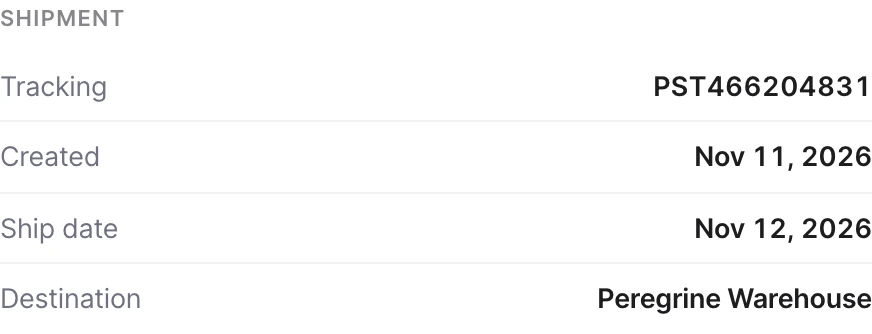
Give support the tracking, ship date and destination displayed on the original inbound so the correction reaches the same physical shipment.
Check the result once
Reopen the entry and check the corrected reference or affected SKU. For a quantity correction, compare the existing approved units and the remaining expected units with the revised list. Keep both versions of the paperwork.
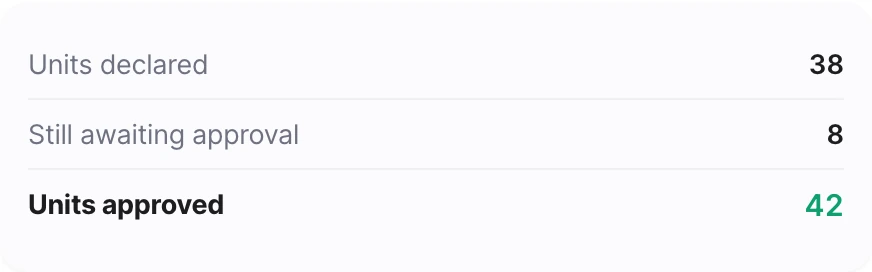
If receiving already approved some units, record both approved and still awaiting approval before requesting a correction.
Common questions
The original entry was already approved. Can I correct it by sending an inbound for minus two?
The quantity fields accept positive units coming in. Explain which approved SKU and quantity is wrong so the actual receipt and stock can be reviewed.
Only the expected arrival date changed. Do I need another inbound?
Keep the physical shipment and reference together. Give receiving the updated carrier estimate if it affects the receiving plan.