
Move your stock from another fulfillment provider
Give each open order one owner and move stock by carton and variant so sales can continue through the handover.
On this page
Use with AI
Move one product family or store at a time if you need to keep selling during the handover. Pick a cutover date and time, including the time zone. Your old provider, Peregrine and your store team need the same answer to who ships the next order for this SKU?
- Unfinished orders
Agree which provider will complete each paid, partially shipped or already labeled order.
- Stock received
Match the old warehouse’s carton list to accepted sale units for each SKU at Peregrine.
- First new sale
Check the assigned location and ordered quantity on one new sale before widening the change.
Agree who owns orders already in flight
Export the open order list from the old provider. Mark the lines already shipped, labeled, being packed and still waiting. Include the Shopify order number, SKU and quantity. Ask the old provider which work it can stop and which parcels have already left. For a two-line order, decide ownership separately if one line has shipped. Keep the existing tracking for that parcel.
Move the cartons and compare counts
Ask the old warehouse for a final dispatch list by carton, variant and sale unit. In the DTC workspace, open Inventory → Reorder report → Warehouse receiving details → Copy details. Paste into a private draft and confirm the ship-to and label with receiving. Then file each physical shipment through Inventory → Create inbound with the correct store and domestic waybill. When the cartons arrive, compare approved quantities against the outgoing list. If 40 units left and 38 are accepted, record the difference against that carton before using 40 in a launch forecast.
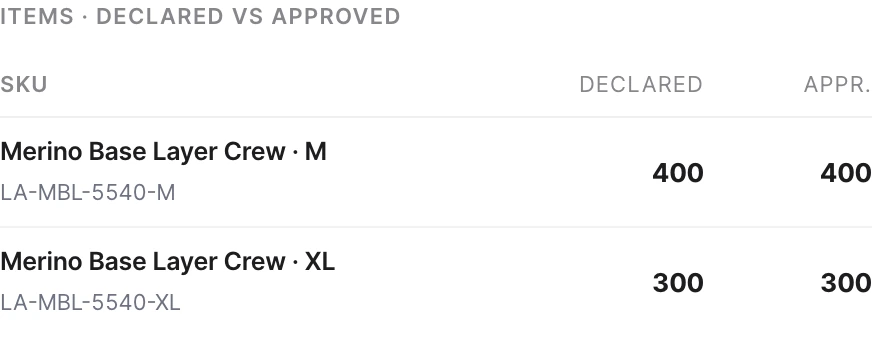
Match approved units for each transferred SKU before comparing the balance remaining at the old facility.

Take the ship-to from the receiving-details card and confirm it for the current transfer before sharing it with the previous provider.
Switch routing for a received SKU
Check the inventory location on the exact Shopify variant and the assignment on the first new order. Confirm the old provider will leave that order with Peregrine. Open Orders, find the same sale and check the quantity and fulfillment state. Keep the previous provider’s list available until every older order has a final owner and tracking where applicable.
Common questions
Can part of my catalog stay at my previous warehouse?
Yes when you have established the locations and order assignments for those variants. Test a single-location basket and a mixed basket before expanding the split. Check mixed locations
Should I import all historical paid orders into the new workspace?
First remove any already shipped or already owned by the previous provider from the proposed handover. Review each remaining unfulfilled quantity and use the existing Shopify fulfillment records to check for duplicates.
My old provider’s export has one total per style. Is that enough?
Request a size and color breakdown with SKUs. A total of 30 cannot tell receiving whether the promised 10 black size M units arrived.
Can I use my old provider's warehouse address for customer returns after switching?
Confirm the return destination for each customer case and update your store’s instructions. An outbound or previous warehouse address can lead to a parcel nobody expects.