
Compare an order charge with its quote
Match the parcel, variant, quantity and destination before asking support to investigate a difference.
On this page
Use with AI
Start with one order and one agreed quote. A goods estimate, a reservation, a card fee and a posted delivery charge can involve the same customer order but answer different questions.
Billing offers separate exports for charges, top-ups and invoices, and the ledger. Check the period where it applies.
Read transcript
- Check the date range at the top of Billing.
- Open Export to see the available files.
- Choose Charges for order costs, or Top-ups and invoices for funding records.
- Start with the quote
Match the date, variant, destination and whether the quote assumed one parcel or several.
- Read the ledger
Find goods and shipping under Charges for the order. Review its holds and releases separately.
- Explain a difference
Compare actual units, service and packed dimensions with the quote. Give support the exact charge row and order.
Make a like-for-like comparison
- Keep the quote version, currency, date and exact parcel description. Check whether it covers one unit, one bundle or several separate parcels, and what it says about duties or special packing.
- In Billing → Balance movements → Charges, find the order. Record the type and posted amount of each sourcing and shipping charge. Check Holds & releases separately.
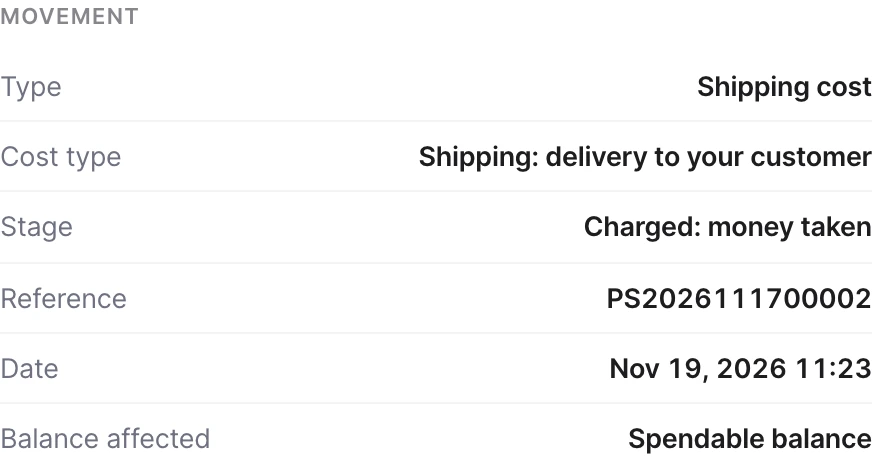
The Stage reads Charged: money taken and the affected wallet is Spendable balance. Use the order reference beside it for the cost comparison.
Platform screenshot · Example dataView full size - Compare the actual SKU, quantity, destination, service and outer packaging against the quote. A larger rigid box or an extra gift may change a parcel even when the product is identical.
- If the difference remains, send the quote, affected references and the exact amount you expected versus the amount posted. Ask support to explain the difference or review an adjustment.
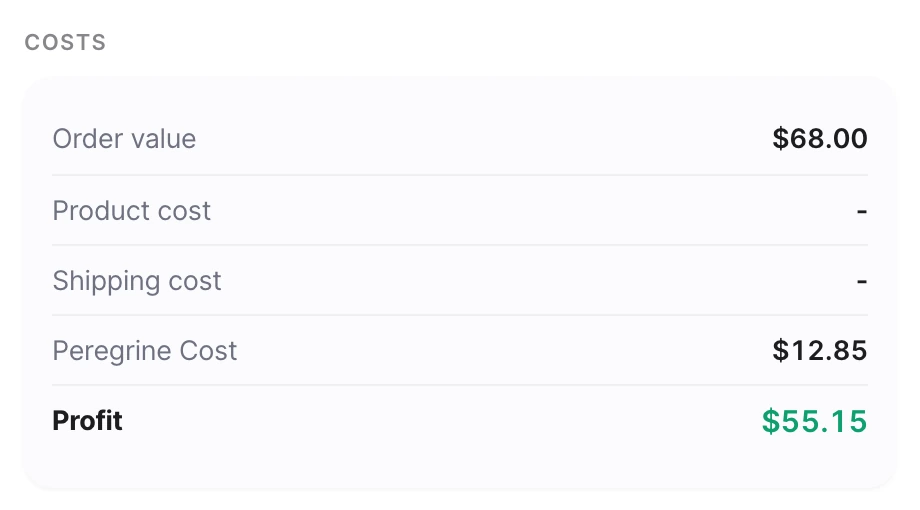
Use the Costs section for the order you are reconciling. Here Peregrine Cost is shown even though the drawer has no separate goods or shipping amount.
Common questions
My brand supplied the stock. Why am I seeing a goods charge?
Identify the exact SKU and inbound that proves your stock was received. Give support the associated order and goods movement so they can check the product's billing setup and the charge.
My quote was for one item but the customer bought two. Is double the price a fair check?
Price the actual two-unit parcel. Goods may double, while packing and shipping depend on the combined parcel and selected service.
Two debits look similar. What information will support need?
Send the order number, movement type, posting time, currency and amount for both. Include any change to the order or parcel and the quote you accepted. Keep payment-card and bank account numbers out of screenshots.