
Identify a credit labeled Bank transfer or manual credit
Distinguish bank funding, an approved account credit and referral earnings before assigning a wallet movement to a payment.
On this page
Use with AI
Bank transfer or manual credit tells you that money was added. The wording alone cannot identify the original transfer or the reason a manual adjustment was approved.
- Bank transfer
Match the sender’s transaction ID, original currency and posting.
- Referral move
Check the transfer from earnings into the spending balance.
- Account adjustment
Match a written approval or ask support for the row’s reason.
Match the credit to a real event
- In Billing → Balance movements, use the date range covering the entry. Open the row and keep its amount, date, reference if present and the affected balance. Check Top-ups and invoices for the same posted credit, rather than counting the two views as separate deposits.
- If you sent money, compare the entry with the transfer confirmation, original currency, bank transaction ID and receipt date. When two receipts could match, ask support which transfer they reconciled.
- If a claim, settlement or other credit was agreed, compare the written approval and amount. If it is labeled Referral earnings moved to balance, compare the transfer from your affiliate earnings into spending balance.
- For a deduction called Balance correction by Peregrine, request its explanation with the signed amount and date. A deduction and a new bank deposit are different events.
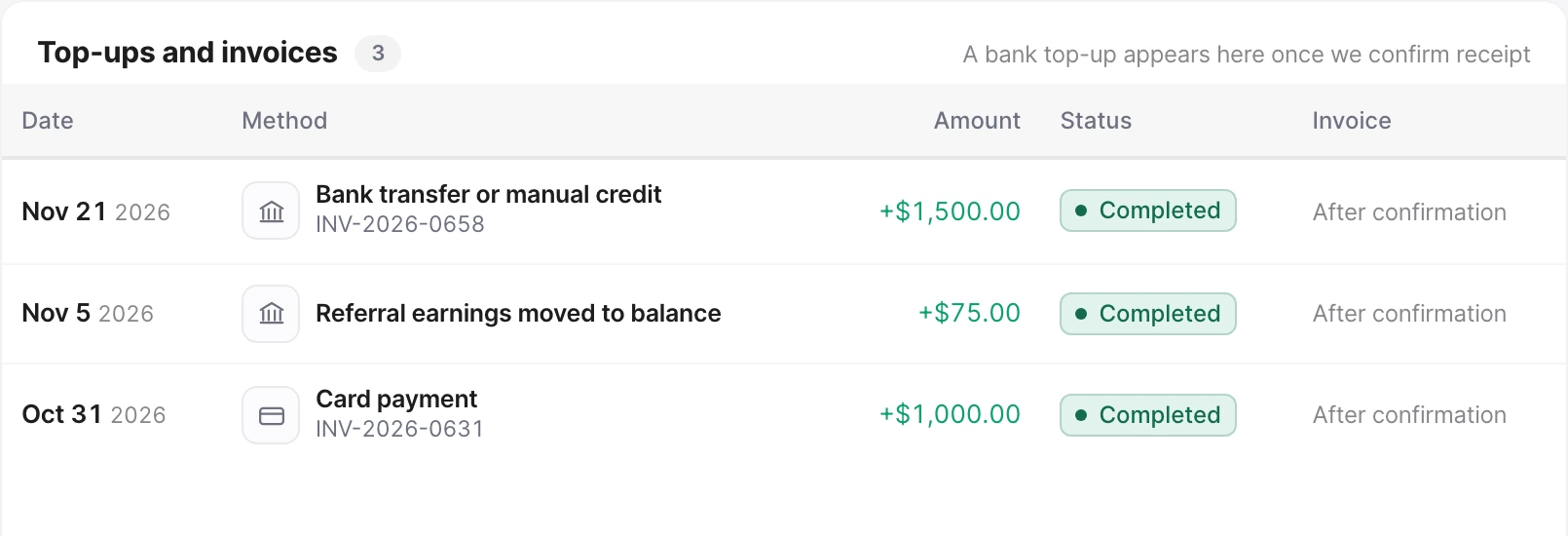
The funding table can group a bank transfer or manual credit. Match its amount and date with your support correspondence or bank record.

A movement can instead say Balance correction by Peregrine. Record its signed amount and date and ask what the correction covers.
Common questions
Does a Top-up row prove that my customer paid for an order?
It records credit to your merchant wallet. The buyer's payment is on the original store order.
Can I assume this credited the open damage claim?
Confirm the specific case, approved amount and destination wallet. Similar amounts can belong to unrelated transactions.
There is no invoice number on the row. Can it still be real?
Yes. Verify the posted movement and ask support for the underlying transaction when the available references are insufficient. An invoice link depends on a document being available.