
Set up permanent product codes for your own DTC brand
Decide whether your entire catalog qualifies, adopt a permanent prefix and verify the manufacturer references saved for each variant.
On this page
Use with AI
Use account-wide automatic codes only when every product on the account is made for one brand that accepts responsibility for identifying it. A store selling its own T-shirts alongside another manufacturer’s mugs should manage the codes on individual products.
- One responsible brand
If all products are made for your DTC brand, review a permanent account prefix with the person keeping your product records.
- Mixed catalog
For resold styles, obtain the maker’s existing codes. Assign own-brand references only on the qualifying products.
- Already enabled
Inspect saved codes on a variant. Pausing the setting stops future assignments and preserves existing references.
Adopt a prefix
- In My products, open a product, then Product identifiers → Manage codes → Set up automatic codes for this DTC brand.

Open a product’s details and select Manage codes before opening the account-wide automatic-code setup.
Platform screenshot · Example dataView full size - Read the account’s eligibility message. Under Permanent brand prefix, choose 2–20 letters, numbers or hyphens, starting with a letter or number. Confirm the spelling with the person who maintains your brand’s product records.
- Only if the statement is true, check that all products are made for your brand and select Enable automatic codes. The prefix becomes permanent.
- Reopen Manage codes on a product with more than one variant. Check the Manufacturer product code for each size or color and retain the references. Enabling the setting fills eligible missing references. New products or variants can receive theirs as they are created or connected.
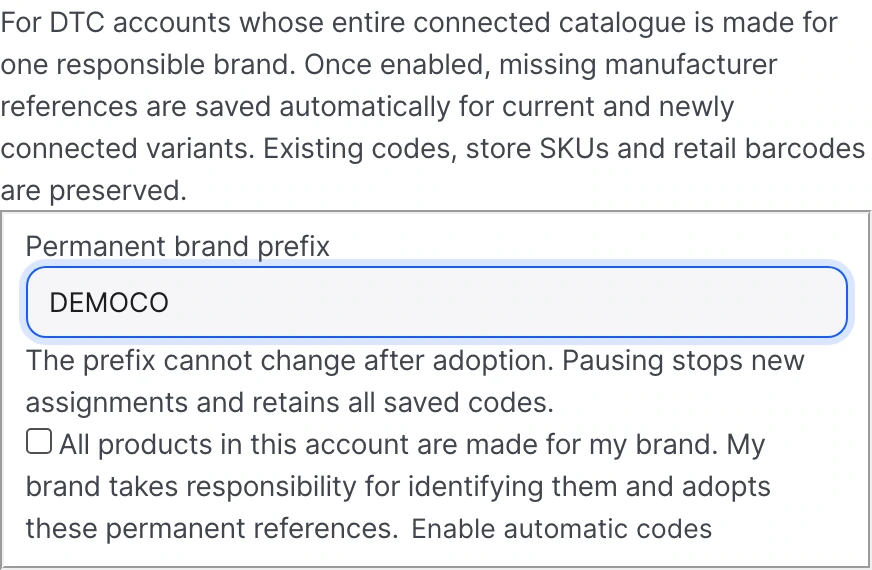
Read the responsibility statement below Permanent brand prefix before enabling codes. DEMOCO is an unsaved example.
Common questions
Does this issue retail barcodes?
No. Existing manufacturer references, store SKUs and genuine retail barcodes keep their separate roles. Only enter a retail barcode already assigned to the item.
What if I only need codes for a few own-brand products?
Use Assign permanent codes for your own brand inside each applicable product. Review the proposed references there, then select Save product codes. For products you resell, use the manufacturer’s actual references.
Can I change my mind or rename the prefix?
Pause automatic codes stops future assignments and keeps saved codes. The adopted prefix stays fixed. If your account says the settings changed in another session, reload them before choosing again.