
Find the reply when a sourcing request says Quoted or Rejected
Use the request’s contact details and reference to find the quote, clarify a rejection or recover a missing reply.
On this page
Use with AI
Quoted means sourcing has answered the request. Open that row in Quotation and look at Contact method and Contact. The costed response goes to the details entered on the request, which can differ from your login email.
- Requested
Open the row and check the product, quantity, market and reply contact on the submitted request.
- Quoted
Look in the contact channel recorded on that request for the costed response.
- Rejected
Ask the account manager what prevented a quote and what specification would make a new review possible.
Recover a missing reply
- In Quotation, select the Quoted tab when you know the request was answered, or All to include every status. Enter the reference or product in the search above the table. Match the product, destination and requested date before opening the row.
- Compare the submitted quantity and product variant with the request you are chasing. Copy its reference if shown. For Not referenced, keep the product name, submitted time and intended contact.
- Check the email or WhatsApp conversation that matches the submitted contact method. If the listed method is phone, use the supplied number as the reference when you contact the team.
- Use WhatsApp your Account Manager on the request if you still cannot find the response. Give the reference and ask for the written quote for the exact market and variant. Keep that reply with your product records.

The request footer opens WhatsApp your Account Manager. Have the request reference and submitted contact ready before following up.
Platform screenshot · Example dataView full size
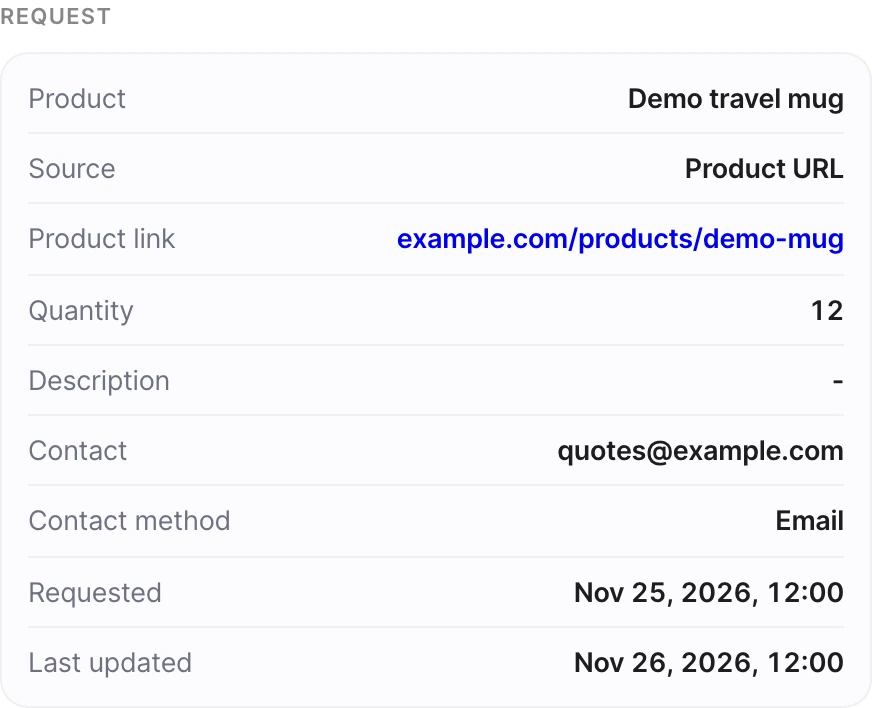
Read Contact method and Contact on the selected request. This example specified Email, so look for the written reply in the listed inbox.
If the request was rejected
The status records that the request closed without a quote. Ask which information or constraint affected the decision. Where a different material, clearer image or revised quantity might be acceptable, agree the new specification before submitting it. A rejected request does not identify the reason on its own.
Common questions
Will I receive a separate dashboard notification when a quote is ready?
Check Quotation and the request’s contact method directly. The merchant notification settings do not currently deliver quote-ready alerts.
Does Quoted approve purchasing or reserve the item?
It identifies a sourcing response. Review its price, specification, quantity and terms before authorizing anything for a sale.
Can I change the destination after receiving the quote?
Give the team the revised destination and ask for updated shipment terms. Keep the earlier quote labeled with its original destination.