
Add the right product codes to each variant
Use the store SKU, manufacturer reference and an existing retail barcode to resolve identifier requests for eligible shipments.
On this page
Use with AI
Some shipping services ask for product identifiers for the exact variant being shipped. A store SKU, manufacturer's model or style code, and retail barcode identify different things.
- Store SKU
Your store’s code identifies the blue shirt in size M. Compare it with the option on the customer order.
- Manufacturer product code
Copy the maker’s model or style reference for that actual item. Own-brand adoption requires responsibility for identification.
- Retail barcode
Enter the assigned GTIN, EAN or UPC if one exists. Leave the field empty if the product has none.
Enter and verify the codes
- Open My products or Inventory, select the exact product and scroll to Product identifiers in the detail drawer and select Manage codes.

Select Manage codes in Product identifiers, then choose the exact size or finish in the editor.
Platform screenshot · Example dataView full size - Choose the correct variant. If Store SKU (automatic) appears, check the value shown. Otherwise enter the SKU used in your store. In Manufacturer product code, enter the model or style reference from the item, its packaging or manufacturer record.
- If the product already has a retail barcode, enter it under Optional retail barcode. Leave that field empty where none exists.
- Choose Save product codes, reopen the editor and check the saved values on the same variant. Tell support which order was held so the original shipment can be reviewed.
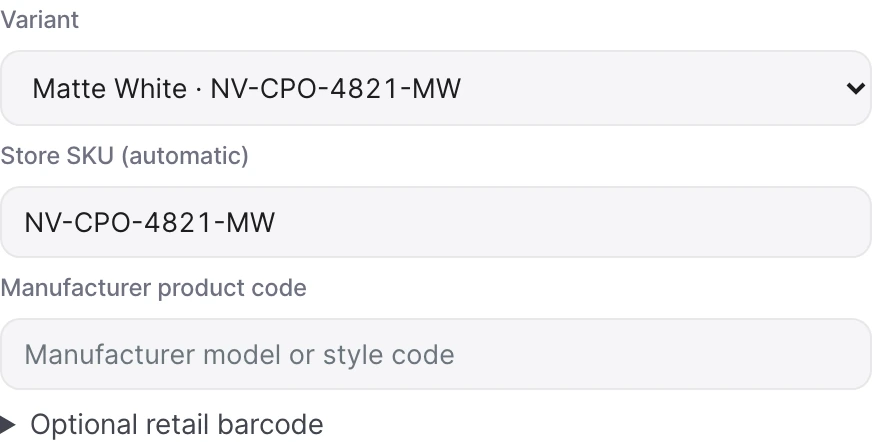
The selected finish and SKU are shown together. Check the Store SKU and enter the manufacturer's actual reference in its own field.
When your own brand is the manufacturer
If the item is made for your brand, you take responsibility for its identification and no reference already exists, the editor offers Assign permanent codes for your own brand. Review each proposed code and retain it in your product records. For resold products, request the real reference from the manufacturer.
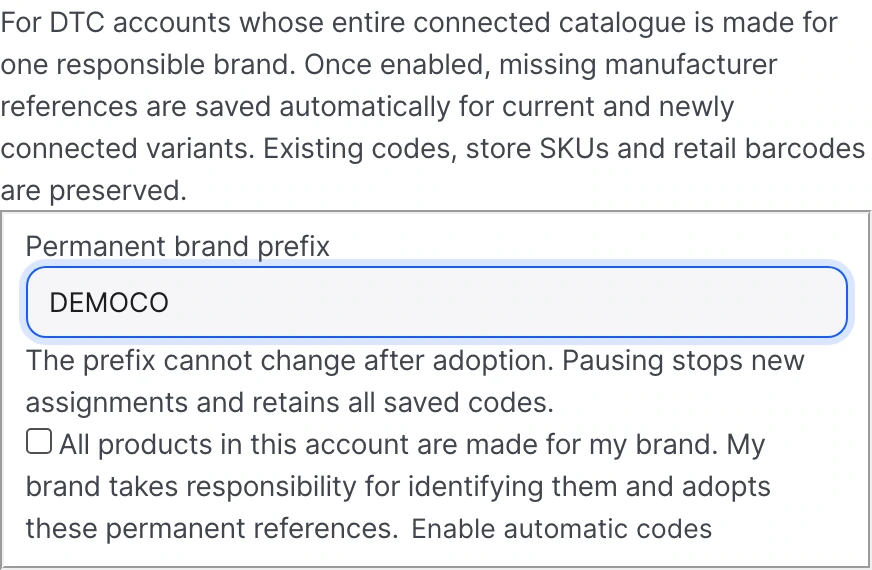
The DTC brand setting carries a separate ownership declaration. Use it only when the covered products were made for your responsible brand.
Common questions
Is the Peregrine SKU automatically the retail barcode?
Use a barcode only when it is genuinely assigned to the product. The SKU you use to find inventory serves a separate purpose.
Can I paste a size code across all colors?
Check how the actual manufacturer identifies each variant. Preserve existing valid codes and the matching store SKU.
Will saving codes release my order immediately?
The carrier or warehouse still has to recheck the shipment. Other issues, such as a missing address field or unavailable stock, can also hold it.